Tech United Eindhoven @Home 2019 Team Description Paper
M.F.B. van der Burgh, J.J.M. Lunenburg, L.L.A.M. van Beek, J. Geijsberts, L.G.L. Janssen, S. Aleksandrov, K. Dang, H.W.A.M. van Rooy, A.T. Hofkamp, D. van Dinther, A. Aggarwal, M.J.G. van de Molengraft
Eindhoven University of Technology, Den Dolech 2, P.O. Box 513, 5600 MB Eindhoven, The Netherlands
http://www.techunited.nl · https://github.com/tue-robotics
Abstract This paper provides an overview of the main developments of the Tech United Eindhoven RoboCup @Home team. Tech United uses an advanced world modeling representation system called the Environment Descriptor. It allows straightforward implementation of localization, navigation, exploration, object detection & recognition, object manipulation and robot-robot cooperation skills based on the most recent state of the world. Recent developments are improved object and people detection via deep learning methods, a generic GUI for different user levels, improved speech recognition, improved natural language interpretation, sound source localization and the integration of a Telegram interface, combined with a conversation engine.
1 Introduction
Tech United Eindhoven is the RoboCup student team of Eindhoven University of Technology that (since 2005) successfully competes in the robot soccer Middle Size League (MSL) and later (2011) also joined the ambitious @Home League. The Tech United @Home team has multiple vice World championship titles, two in the last three years, and is the vice European champion of the 2018 RoboCup German Open. Tech United Eindhoven consists of (former) PhD and MSc. students and staff members from different departments within the Eindhoven University of Technology.
Many parts of our software are interacting with the world-model. Our worldmodel, Environment Descriptor, is a database with 3D representations of objects. This is described in section 2. Other topics described in this paper are image recognition, pose detection, sound source localisation, Human-Robot interaction, Software sharing and community contributions.
The previous years our focus has been on our own robots, AMIGO and SERGIO. This year we are shifting our focus to the Toyota HSR. This Team Description Paper is part of the qualification package for RoboCup 2019 in Sydney, Australia and describes the current status of the @Home activities of Tech United Eindhoven.
2 Environment Descriptor (ED)
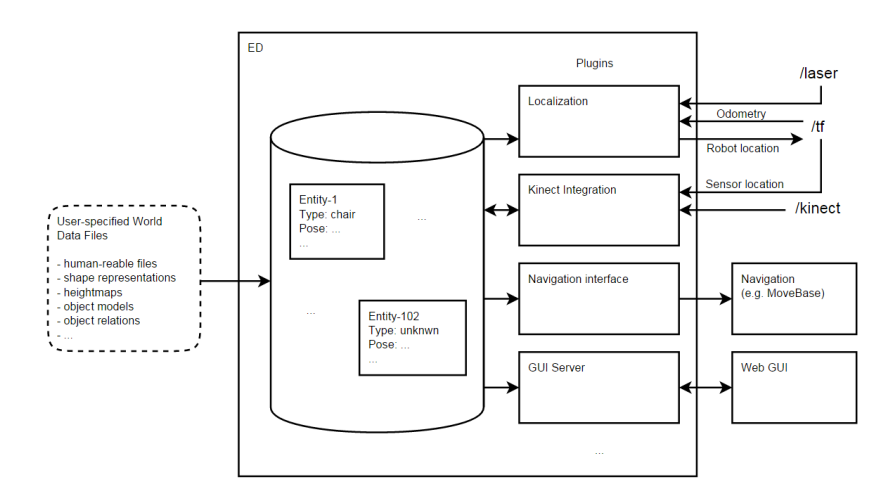
The TU/e Environment Descriptor (ED) is a Robot Operating System (ROS) based 3D geometric, object-based world representation system for robots. In itself ED is a database system that structures multi-modal sensor information and represents this in an object-based world representation that can be utilized for robot localisation, navigation, manipulation and interaction functions. Figure 1 shows a schematic overview of ED.
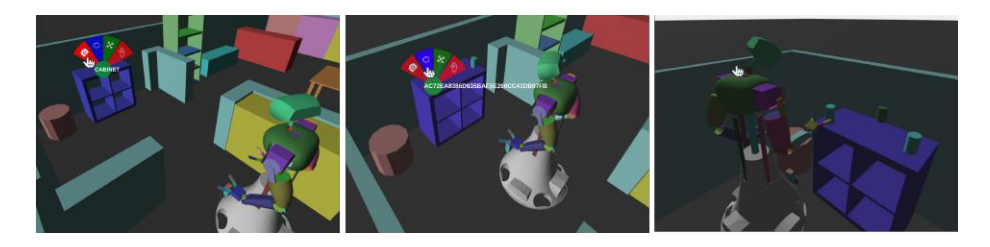
ED has been used on our robots AMIGO and SERGIO in the OPL for many years and is now also used on the Toyota HSR in DSPL. In previous years, developments have been focussed on making ED platform independent. As a result ED has been used on the PR2 system, Turtlebot and Dr. Robot systems (X80). Also multiple other @Home teams have been using ED. ED is a single re-usable environment description that can be used for a multitude of desired functionalities instead of having different environment representations for localization, navigation, manipulation, interaction, etc.. An improvement in this single, central world model will reflect in the performances of the separate robot capabilities. It omits updating and synchronization of multiple world models. At the moment different ED plugins exist that enable robots to localize themselves, update positions of known objects based on recent sensor data, segment and store newly encountered objects and visualize all this in RViz and through a web-based GUI, illustrated in Figure 7.
2.1 Localization, Navigation and Exploration
The ed localization plugin implements AMCL based on a 2D render from the central world model. In order to navigate, a model of the environment is required. This model is stored in ED. From this model, a planning representation is derived that enables using the model of the environment for navigation purposes.
With use of the ed navigation plugin, an occupancy grid is derived from the world model and published. This grid can be used by a motion planner to perform searches in the configuration space of the robot.
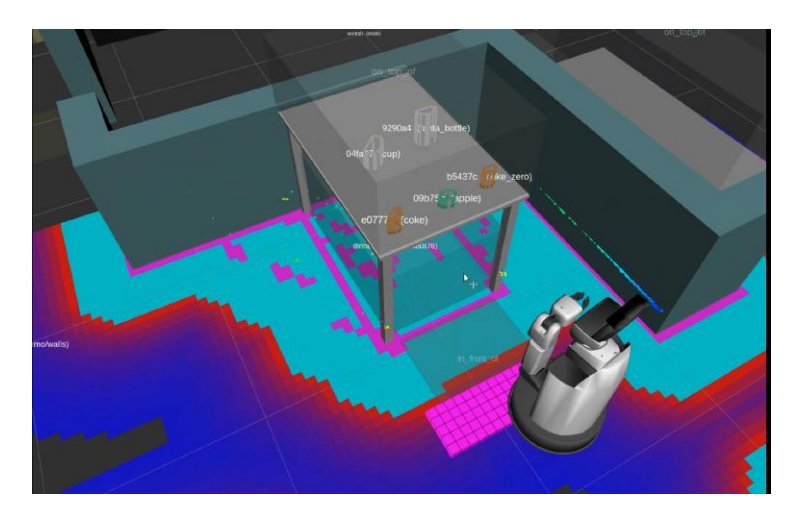
With the use of the cb base navigation package the robots are able to deal with end goal constraints. With use of a ROS service, provided by the ed navigation plugin, an end goal constraint can be constructed w.r.t. a specific world model entity described by ED. This enables the robot to not only navigate to poses but also to areas or entities in the scene. Navigation to an area is also shown in Figure 2. Somewhat modified versions of the local and global ROS planners available within move base are used.
2.2 Object detection
Detection & Segmentation ED enables integrating sensors through the use of the plugins present in the ed sensor integration package. Two different plugins exist: 1. The laser plugin: Enables tracking of 2D laser clusters. This plugin can be used to track dynamic obstacles such as humans. 2. The kinect plugin: Enables world model updates with use of data from a RGBD camera. This plugin exposes several ROS services that realize different functionalities:
- (a) Segment: A service that segments sensor data that is not associated with other world model entities. Segmentation areas can be specified per entity in the scene. This allows to segment object 'on-top-of' or 'in' a cabinet. All points outside the segmented area are ignore for segmentation.
- (b) FitModel: A service that fits the specified model in the sensor data of a RGBD camara. This allows updating semi-static obstacles such as tables and chairs.
The ed sensor integration plugins enable updating and creating entities. However, new entities are classified as unknown entities. Classification is done in ed perception plugin package.
2.3 Object grasping, moving and placing
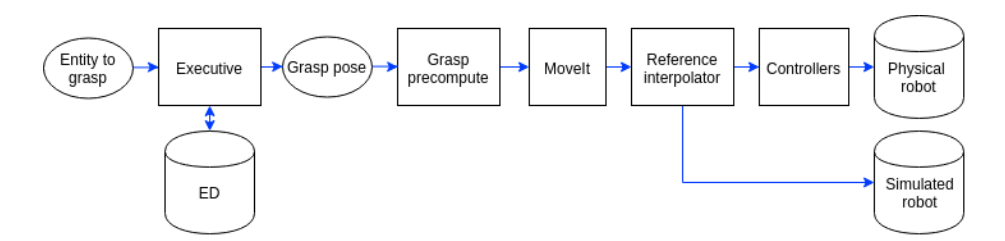
As for manipulating objects, the architecture is only focused on grasping. The input is the specific target entity in the world model ED. The output is the grasp motion, i.e. joint positions for all joints in the kinematic chain over time. Figure 3 shows the grasping pipeline. A python executive queries the current pose of the entity from the world model. The resulting grasp pose goes to the grasp precompute component which makes sure that the object is approached in a proper way. MoveIt will produce joint trajectories over time with use of the current configuration, the URDF model, collision meshes from ED and the final configuration.
The grasping pipeline is extended with an empty spot designator and grasping pose determination. The empty spot designator searches in an area, like 'on-top-of'of the dinner table, for an empty spot to place an object by using the occupied area by other objects in this area.
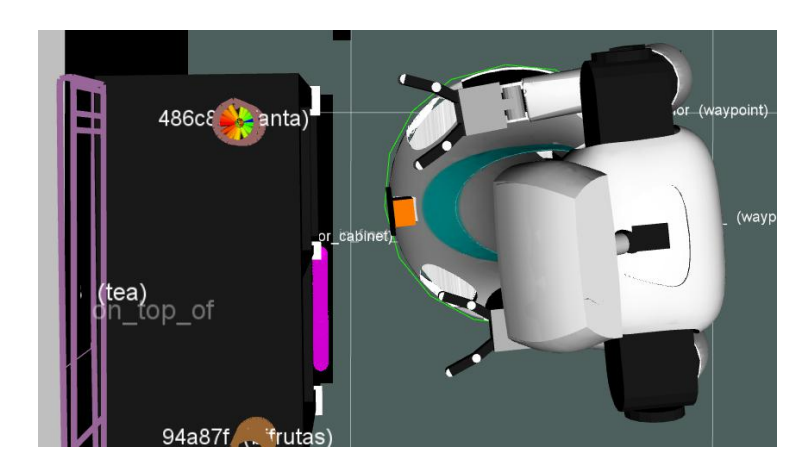
The grasp pose determination uses the information about the position and shape of the object in ED to determine the best grasping pose. The grasping pose is a vector relative to the robot. An example of the determined grasping pose is shown in Figure 4.
3 Image Recognition
The image recognition packages apply state of the art image classification techniques based on Convolution Neural Networks (CNN).
3.1 Object recognition using Deep Learning
Object recognition is done using Tensorflow by retraining the top-layer of a Inception V3 neural network. The top layers are retrained on a custom dataset using a soft-max top-layer that maps the image representation on a specified set of labels.
In order to create a new training set for specific objects the image recognition packages contain several tools for annotating objects. Tools for retraining neural networks are also included.
3.2 Face recognition
Face detection and recognition is done using OpenFace based on Torch. Open-Face is an existing state-of-the-art face recognition library. We implemented a ROS node that enables the use of these advanced technologies within the ROS network.
3.3 ROS packages
Our image recognition ROS packages can be found on GitHub together with tutorials and documentation. Recently, they have also been added to the ROS Kinetic package list and can be installed as Debian packages: ros-kinetic-imagerecognition
4 Pose detection
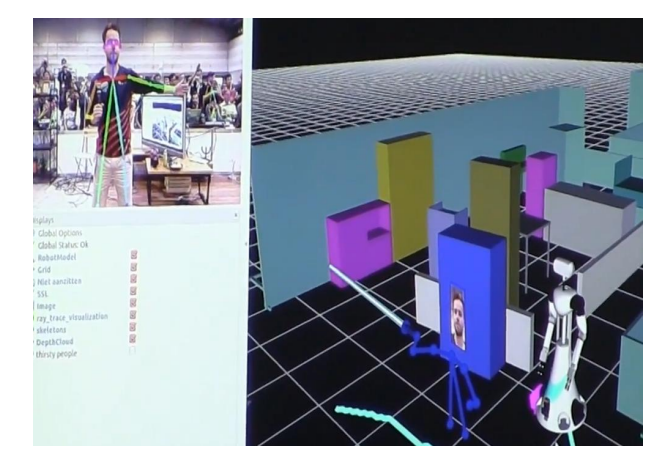
Pose detection is done with OpenPose. OpenPose is a real-time multi-person keypoint detection library for body, face, and hands. It's used for example in the restaurant challenge to detect waving persons. We have used it to detect pointing of an operator to objects in a room. For that we ray-traced the vector of the arm in our world model and extracted the first object that the ray intersects. This enables the robot to understand commands like: "Give me that object". See figure 5 for an example of the ray-tracing.
5 Sound source localization
To perform proper speech recognition, knowing the direction of the sound is important to capture the sound source properly. We localize the sound source by determining the direction of arrival (DOA) with use of the microphones of the Matrix Creator. The detection is done by first calculating the time cross correlation between four pairs of opposing microphones. Second, the microphone pair with the lowest phase shift w.r.t. the opposing microphone is selected as being perpendicular to the source. Finally, the direction of the source can be determined by combining this information with the energy level of the microphones. This upgrade compared to the stock DOA code of the Matrix Creator has been pushed back to their repositories. Our software for the DOA detection is available on GitHub, as well as a ROS package that exposes the DOA detections via a pose topic. Because the DSPL doesn't allow hardware changes to the robot, this software needs to be re-implemented for the Toyota HSR.
6 Human-Robot Interface
The acceptance of a robot is largely determined by the interaction with it. Hence, we try to have multiple ways of interacting with the robot in an intuitive manner. The two highlighted in this paper are our WebGUI, subsection 6.1, and Telegram interface, subsection 6.2, which uses our conversation engine, subsection 6.3.
6.1 Web GUI
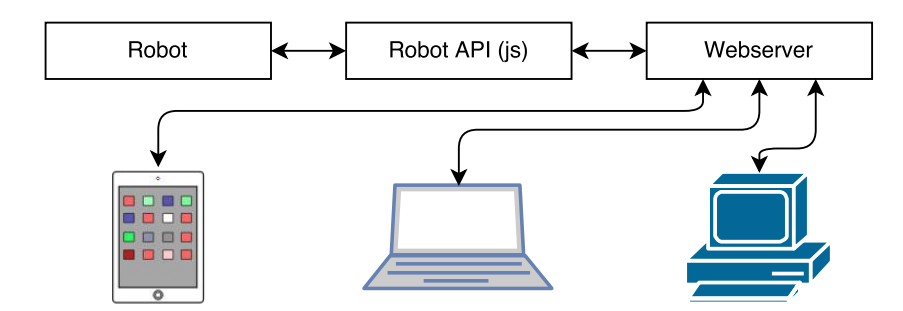
In order to interact with the robot, apart from speech, we have designed a webbased Graphical User Interface (GUI). The interface uses HTML5 and which we host on the robot itself. This allows multiple users on different platforms (e.g. Android, iOS) to access functionalities of the robot. The interface is implemented in JavaScript with AngularJS and it offers a graphical interface to the Robot API which exposes all the functionality of the robot. Figure 6 gives an overview of the connections between these components. Figure 7 gives an example of various user interactions that are possible with the GUI and the different commands that can be given to the robot while interacting with the virtual scene.
6.2 Telegram
The telegram interface to our robots is a ROS wrapper around the pythontelegram-bot library. The software exposes four topics. It accepts both text and images to and from the robot. To communicate with the robot you need to send /start. As the interface allows only one master of the robot at a time.
The interface itself doesn't contain any reasoning. This is all done by the conversation engine, which is described in the following subsection.
6.3 Conversation Engine
The conversation engine bridges the gap between text input and an action planner (called action server). Text can be received from either Speech-to-Text or from a chat interface, like Telegram. The text is parsed according to a (Feature) Context Free Grammar, resulting in an action description in the form of a nested mapping. In the action description, (sub)actions and their parameters are filled in. This may include references such as 'it'.
Based on the action description, the action server tries to devise a sequence of actions and parameterize those with concrete object IDs. It may be that more information is needed (e.g. "Place a coke on the dinner table"). The action then fails for this reason and then the conversation engine must interact with the user to obtain the missing information (e.g. "Where should I pick that up?").
When the user supplies more information, the input is parsed and the current action description is extended and retried. To parse the additional information to fill in gaps of missing info, the conversation engine must know what field of missing information (e.g. 'source-location' of a 'grab' action) must be parsed according to what rules. The conversation engine is therefore parameterized with a mapping that links fields containing e.g. 'location' to a rule in the grammar called 'LOCATION'.
Lastly, it keeps the user 'informed' while actions are being performed by reporting on the current subtask.
7 Re-usability of the system for other research groups
Tech United takes great pride in creating and maintaining open-source software and hardware to accelerate innovation. Tech United initiated the Robotic Open Platform website, to share hardware designs. All our software is available on GitHub. All packages include documentation and tutorials. Tech United and its scientific staff have the capacity to co-develop (15+ people), maintain and assist in resolving questions.
8 Community Outreach and Media
Tech united has organised 3 tournaments: Dutch Open 2012, RoboCup 2013 and the European Open 2016. Our team member Loy van Beek has been a member of the Technical Committee during the period: 2014-2017. We also carry out many promotional activities for children to promote technology and innovation. Tech United often visits primary and secondary schools, public events, trade fairs and has regular TV appearances. Each year, around 50 demos are given and 25k people are reached through live interaction. Tech United also has a very active website, and interacts on many social media like: Facebook, Instagram, YouTube, Twitter and Flickr. Our robotics videos are often shared on the IEEE video Friday website.
9 HSR's Software and External Devices
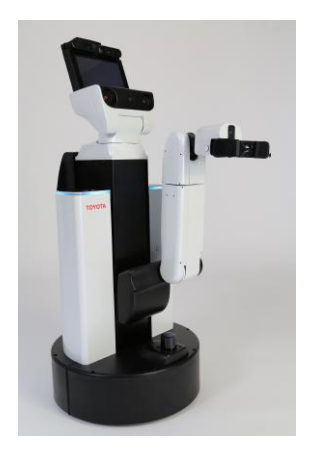
We use a standard Toyota HSR robot. To differentiate our unit, we named it HERO. We wanted to link it's name to our AMIGO and SERGIO domestic service robots.
HERO's Software Description An overview of the software used by the Tech United Eindhoven @Home robots can be found in Table 1. All our software is developed open-source at GitHub.
This is our current software implementation, which matches our own robots, AMIGO and SERGIO, which have participated with in the open platform league.
External Devices HERO relies on the following external hardware:
– Official Standard Laptop
Cloud Services HERO connects the following cloud services: None
Table 1. Software overview
| Operating system | Ubuntu 16.04 LTS Server |
|---|---|
| Middleware | ROS Kinetic [1] |
| Simulation | Gazebo |
| World model | Environment Descriptor (ED), custom https://github.com/tue-robotics/ed |
| Localization | Monte Carlo [2] using Environment Descriptor (ED), custom https://github.com/tue-robotics/ed_localization |
| SLAM | Gmapping |
| Navigation | CB Base navigation https://github.com/tue-robotics/cb_base_navigation Global: custom A* planner Local: modified ROS DWA [3] |
| Arm navigation | MoveIt! |
| Object recognition | Tensorflow ROS https://github.com/tue-robotics/image_recognition/tree/master/tensorflow_ros |
| People detection | Custom implementation using contour matching https://github.com/tue-robotics/ed_perception |
| Face detection & recognition | Openface ROS https://github.com/tue-robotics/image_recognition/tree/master/openface_ros |
| Speech recognition | Julius Speech Recognition https://github.com/julius-speech/julius |
| Speech synthesis | Toyota Text-to-Speech |
| Task executors | SMACH https://github.com/tue-robotics/tue_robocup |
References
- Morgan Quigley, Ken Conley, Brian P. Gerkey, Josh Faust, Tully Foote, Jeremy Leibs, Rob Wheeler, and Andrew Y. Ng. ROS: an open-source robot operating system. In ICRA Workshop on Open Source Software, 2009.
- D. Fox. Adapting the sample size in particle filters through kld-sampling. The International Journal of Robotics Research, 22(12):985–1003, 2003.
- D. Fox, W. Burgard, and S. Thrun. The dynamic window approach to collision avoidance. IEEE Magazine on Robotics & Automation, 4(1):23–33, 1997.