Tech United Eindhoven @Home 2017 Team Description Paper
M.F.B. van der Burgh, J.J.M. Lunenburg, R.P.W. Appeldoorn, R.W.J. Wijnands, T.T.G. Clephas, M.J.J. Baeten, L.L.A.M. van Beek, R.A. Ottervanger, H.W.A.M. van Rooy, M.J.G. van de Molengraft
Eindhoven University of Technology, Den Dolech 2, P.O. Box 513, 5600 MB Eindhoven, The Netherlands
http://www.techunited.nl · https://github.com/tue-robotics · http://www.tue.nl · https://github.com/tue-robotics/ed_localization · https://github.com/tue-robotics/ed_navigation · https://github.com/tue-robotics/cb_base_navigation · https://github.com/tue-robotics/ed_perception · https://github.com/tue-robotics/image_recognition · https://github.com/tue-robotics/robot-api · http://www.roboticopenplatform.org/ · https://github.com/tue-robotics/rtt_control_components · https://github.com/tue-robotics/fast_simulator · https://github.com/tue-robotics/ed · http://wiki.ros.org/gmapping · https://github.com/tue-robotics/tue_manipulation · https://github.com/tue-robotics/image_recognition/tree/master/tensorflow_ros · https://github.com/tue-robotics/image_recognition/tree/master/openface_ros · https://github.com/tue-robotics/dragonfly_speech_recognition · https://github.com/tue-robotics/tue_robocup · https://github.com/tue-robotics/tue_mobile_ui · https://www.facebook.com/techunited · https://www.youtube.com/user/TechUnited · https://twitter.com/TechUnited · https://www.flickr.com/photos/techunited/
Abstract This paper provides an overview of the main developments of the Tech United Eindhoven RoboCup@Home team. Tech United uses an advanced world modeling representation system called the Environment Descriptor that allows straight forward implementation of localization, navigation, exploration, object detection & recognition, object manipulation and robot-robot cooperation skills. Recently developments are improved object detection via deep learning methods, a generic GUI for different user levels, improved speech recognition and improved natural language interpretation.
1 Introduction
Tech United Eindhoven is the RoboCup student team of Eindhoven University of Technology that (since 2005) successfully competes in the robot soccer Middle Size League (MSL) and later (2011) joined the ambitious @Home League. The Tech United @Home team is the vice champion of RoboCup 2016 in Leipzig and the reigning European Champion of the 2016 RoboCup European Open. The robot soccer middle-size Tech United team has an even greater track record with 3 world championship titles. See the Tech United website for more results. Tech United Eindhoven consists of (former) PhD and MSc students and staff members from different departments within the Eindhoven University of Technology.
This Team Description Paper is part of the qualification package for RoboCup 2017 in Nagoya, Japan and describes the current status of the @Home activities of Tech United Eindhoven. The main achievement of our long-term development is our generic world model ED. Recent developments are improved object detection via deep learning methods, a generic GUI for different user levels, improved speech recognition and improved natural language interpretation.
2 Environment Descriptor (ED)
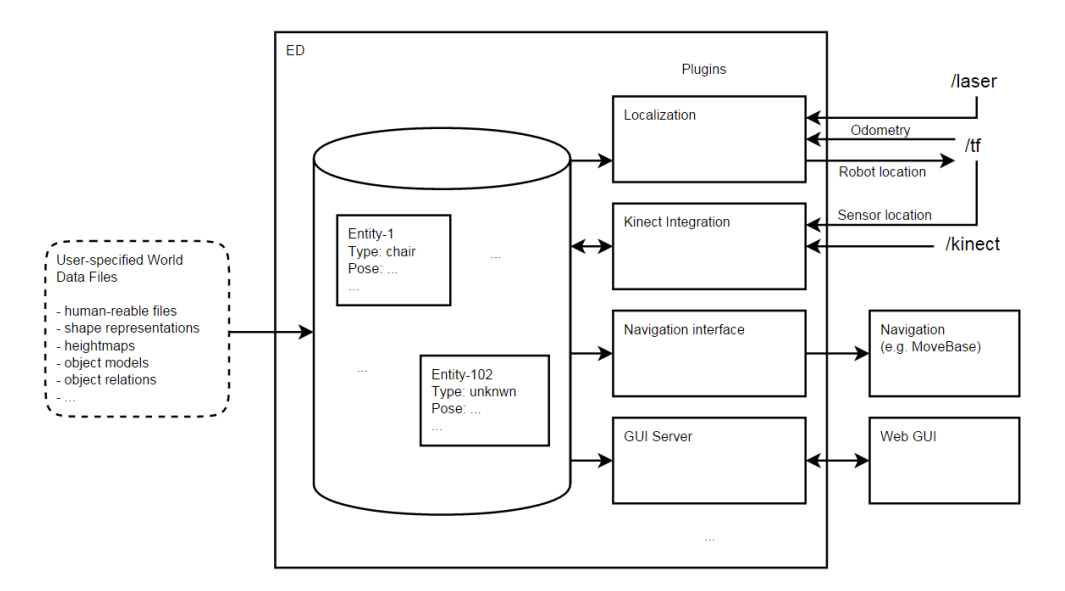
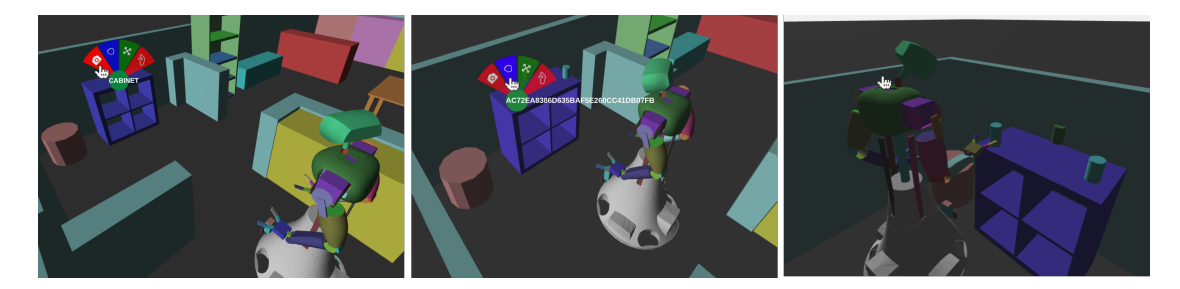
The TUe Environment Descriptor (ED) is a Robot Operating System (ROS) based 3D geometric, object-based world representation system for robots. In itself ED is database system that structures multi-modal sensor information and represents this in an object-based world representation that can be utilized for robot localisation, navigation, manipulation and interaction functions. See Figure 1 for a schematic overview of ED. ED is used on our robots AMIGO and SERGIO in the open @Home league and will be used on the Toyota HSR in the DSPL. In previous years, developments have been focussed towards making ED platform independent. As a results ED had been used on the PR2 system, Turtlebot and Dr. Robot systems (X80). ED is one re-usable environment description that can be used for a multitude of needed functionalities. Instead of having different environment representations for localization (Adaptive Monte Carlo Localization) (AMCL), navigation (MoveBase), manipulation (MoveIt!), interaction, etc.. An improvement in this single, central world model will reflect in the performances of the separate robot capabilities. It omits updating and synchronization of multiple world models. At the moment different ED modules exist that enable robots to localize themselves, update positions of known objects based on recent sensor data, segment and store newly encountered objects and visualize all this through a web-based GUI, illustrated in Figure 10.
2.1 Localization, Navigation and Exploration
The ED-localization plugin implements AMCL based on a 2D render from the central world model. In order to navigate, a model of the environment is required. This model is stored in the (ED). From this model, a planning representation is derived that enables using the model of the environment for navigation purposes.
With use of the ed_navigation plugin, an occupancy grid is derived from the world model and published as a nav_msgs/OccupancyGrid. This grid can be used by a motion planner to perform searches in the configuration space of the robot.
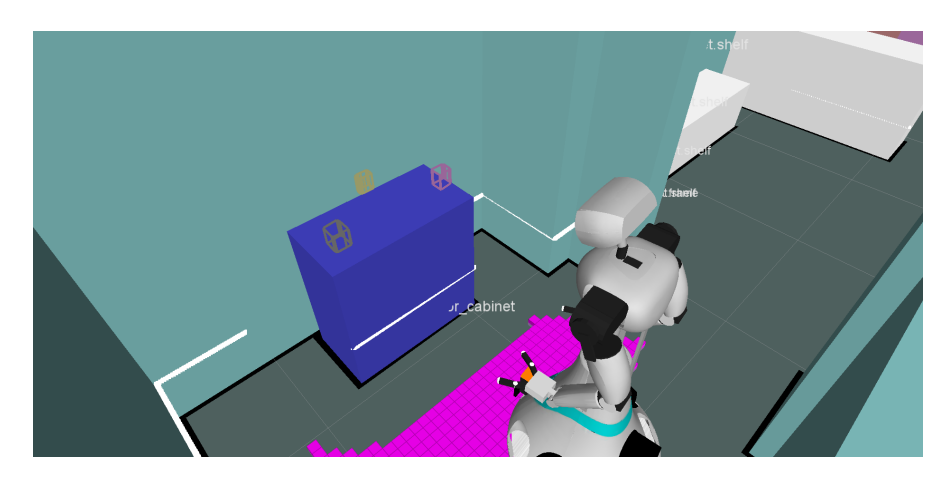
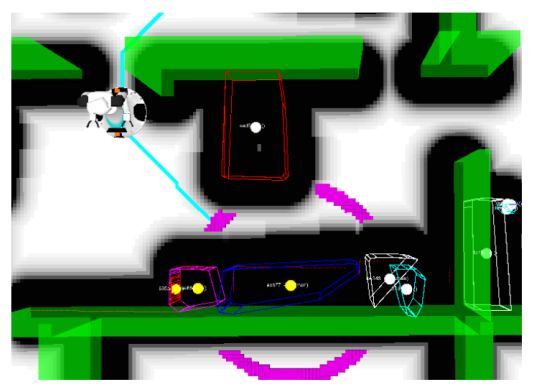
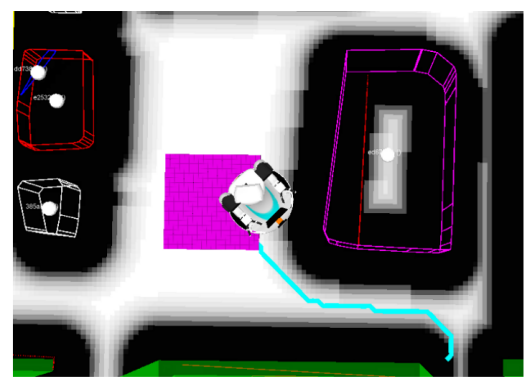
With the use of the cb_base_navigation ROS package. The robots are able to deal with end goal constraints. With use of a ROS service, provided by the ed_navigation plugin, an end goal constraint can be constructed w.r.t. a specific world model entity described by ED. This enables the robot to not only navigate to poses but also to areas or entities in the scene, as illustrated by Figure 3. Somewhat modified versions of the local and global ROS planners available within move_base are used.

2.2 Object detection
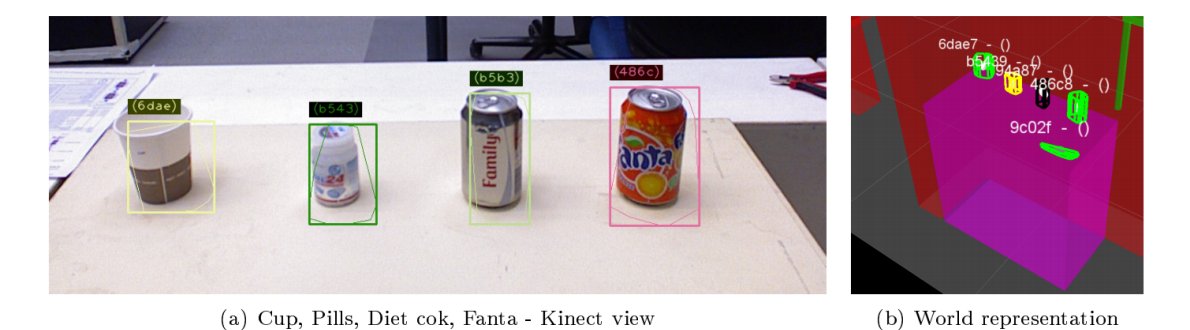
Detection & Segmentation ED enables integrating sensor data with use of the plugins present in the ed_sensor_integration package. Two different plugins do exist: 1. laser_plugin: Enables tracking of 2D laser clusters. This plugin can be used to track dynamic obstacles such as humans. 2. kinect_plugin: Enables world model updates with use of Kinect data. This plugin exposes several ROS services that realize different functionalities:
- (a) Segment: Service that segment sensor data that is not associated with other world model entities. Segmentation areas can be specified per entity in the scene. This allows to segment object 'on-top-of' or 'in' a cabinet.
- (b) FitModel: Service that fits the specified model in the sensor data of the Kinect. This allows updating semi-static obstacles such as tables and chairs.
The ed_sensor_integration plugins enable updating and creating entities. However, new entities are classified as unknown entities.
2.3 Object grasping, moving and placing
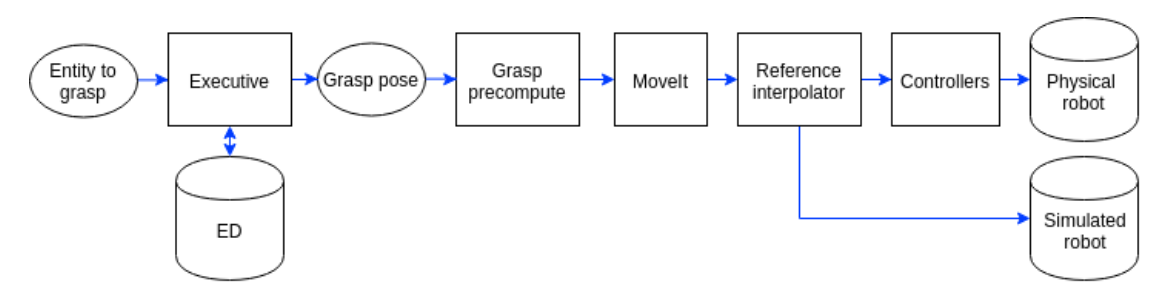
As for manipulating objects, the architecture is only focused on grasping. The input is the specific target entity in the world model ED. The output is the grasp motion, i.e. joint positions for all joints in the kinematic chain over time. Figure 5 shows the grasping pipeline. A python executive queries the current pose of the entity from ED. The resulting grasp pose goes to the grasp precompute component which makes sure that we approach the object in a proper way. MoveIt will produce joint trajectories over time with use of the current configuration, the URDF model and the final configuration. Note that MoveIt currently does not take any information from ED into account. Finally, the trajectories are sent to the reference interpolator which sends the trajectories either to the controllers or the simulated robot.
The grasping pipeline is extended with an empty spot designator and grasping point determination. The empty spot designator search in an area for an empty spot to place an object by using the occupied area by other objects in this area.
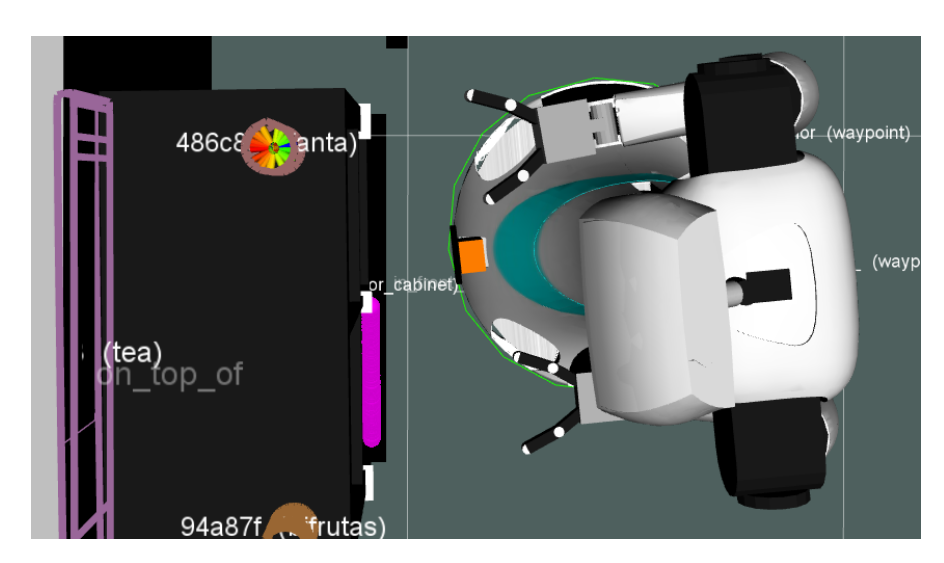
The grasp point determination uses the information about the position and shape of the object in ED to determine the best grasping point. The grasping point is a vector relative to the robot. An example of the determined grasping point is shown in Figure 6.
3 Image Recognition
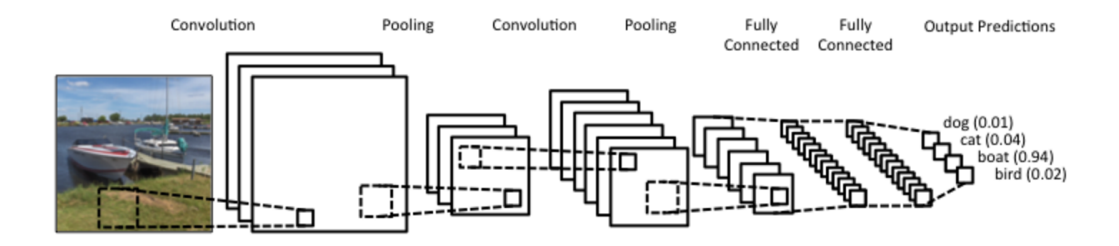
In order the classify or train unknown entities, the ed_perception plugin exposes ROS Services to classify the entities in the world model. The ed_perception module interfaces with various image_recognition nodes that apply state of the art image classification techniques based on Convolution Neural Networks (CNN) illustrated in Figure 8.
3.1 Object recognition using Deep Learning
Object recognition is done using Tensorflow: retraining the top-layer of a Inception V3 neural network. The top layers are retrained on a custom dataset using a soft-max top-layer that maps the image representation on a specified set of labels.
In order to create a new training set for specific objects, the ed_perception and the image_recognition packages contains several tools for segmenting and annotating objects. Also tools for retraining neural networks are included.
3.2 Face recognition
Face detection and recognition is done using Openface based on Torch. Openface is an existing state-of-the-art face recognition library. We implemented a ROS node that enables the use of these advanced technologies within the ROS network.
3.3 ROS packages
Our image recognition ROS packages can be found at GitHub with tutorials and documentation. Recently, they have also been added to the ROS Kinetic package list and can be installed as Debian packages:
r o s−k i n e t i c −image−r e c o g n i t i o n
4 Human-Robot Interface
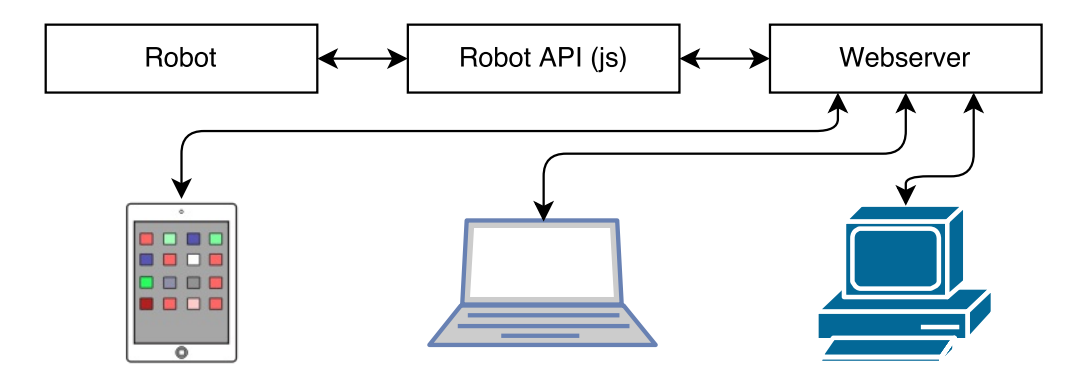
In order to interact with the robot aside of speech, a web-based Graphical User Interface (GUI) has been designed. The interface has been made with HTML5 and is hosted on the robot itself. This allows multiple users on different platforms (e.g. Android, iOS) to access functionality of the robot. The interface is implemented in JavaScript with AngularJS and it offers a graphical interface to the Robot API which exposes all the functionality of the robot. Figure 9 gives an overview of the connections between these components. Figure 10 gives an example of various user interactions that are possible with the GUI and the different commands that can be given to the robot while interacting with the virtual scene.
5 Robot Descriptions
Robot descriptions and specifications.
5.1 Robot Hardware Descriptions
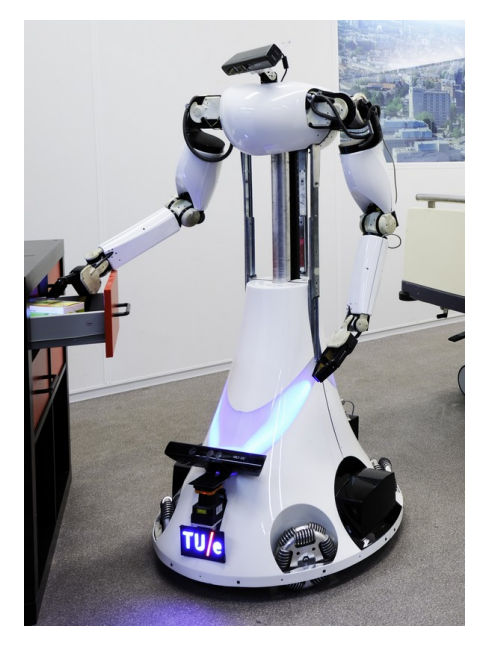
AMIGO (Autonomous Mate for Intelligent Operations, see Fig. 11) has competed in RoboCup@Home since 2011. Its design is based on a Middle Size League soccer robot, equipped with two Philips Experimental Robotic Arms mounted on an extensible upper body. Based on our experiences with AMIGO, SERGIO (Second Edition Robot for Generic Indoor Operations, see Fig. 12) has been developed. The main differences with AMIGO are the use of Mecanum wheels which are compliantly suspended, the torso with two degrees of freedom and the modular setup. The core specifications of AMIGO and SERGIO can be found in Table 1. More details about the robots can be found on the Robotic Open Platform, where all CAD drawings, electrical schemes and CAD files are published.
Core specifications of AMIGO and SERGIO
| AMIGO | SERGIO | |
|---|---|---|
| Name | Autonomous Mate for IntelliGent Operations | Second Edition Robot for Generic Indoor Operations |
| Base | Fully holonomic omni-wheel platform based on a soccer robot | Fully holonomic Mecanum wheel platform with independent wheel suspension |
| Torso | 1 vertical DoF using a ball screw | 1 nearly vertical DoF using a coupled ankle and knee joint, 1 rotational hip joint |
| Manipulators | 2 7-DoF Philips Experimental Robotic Arms | 2 7-DoF custom arms |
| Neck | Pan-tilt unit using two Dynamixel RX-64 servo actuators | Pan-tilt unit using two Dynamixel RX-64 servo actuators |
| Head | Kinect for XBox 360 | Kinect for XBox 360 |
| External devices | Wireless emergency button | Wireless emergency button |
| Dimensions | Diameter: 0.75 m, height: ±1.5 m | Base: 0.7 m × 0.6 m, height: ±1.65 m |
| Weight | ±70 kg | ±70 kg |
| Additional sensors | Hokuyo UTM-30LX laser range finder on base and torso | Hokuyo UTM-30LX laser range finder on base (2x) and torso (tilting) |
| Microphone | RØDE Videomic | RØDE Videomic Pro |
| Batteries | 4× Makita 24 V, 3.3 Ah | 4× Makita 24 V, 3.3 Ah |
| Computers | 3× AOpen Mini PC with Core-i7 processor and 8 Gb RAM | 3× Gigabyte mini ITX board with Core-i7 processor and 16 Gb RAM |

5.2 Robot Software Description
An overview of the software used by the Tech United Eindhoven @Home robots can be found in Table 2. All our software is developed open-source at GitHub.
Currently, we have some image_recognition packages released into the current ROS Kinetic distribution and can be installed with use of apt.
Software overview of the robots.
| Operating system | Ubuntu 16.04 LTS Server |
|---|---|
| Middleware | ROS Kinetic [1] |
| Low-level control software | Orocos Real-Time Toolkit [2] |
| https://github.com/tue-robotics/rtt_control_components | |
| Simulation | Custom kinematics + sensor simulator |
| https://github.com/tue-robotics/fast_simulator | |
| World model | Environment Descriptor (ED), custom |
| https://github.com/tue-robotics/ed | |
| Localization | Monte Carlo [3] using Environment Descriptor (ED), custom |
| https://github.com/tue-robotics/ed_localization | |
| SLAM | Gmapping package |
| http://wiki.ros.org/gmapping | |
| Navigation | CB Base navigation |
| https://github.com/tue-robotics/cb_base_navigation | |
| Global: custom A* planner | |
| Local: modified ROS DWA [4] | |
| Arm navigation | Custom implementation using MoveIt and Orocos KDL |
| https://github.com/tue-robotics/tue_manipulation | |
| Object recognition | Tensorflow ROS |
| https://github.com/tue-robotics/image_recognition/tree/ | |
| master/tensorflow_ros | |
| People detection | Custom implementation using contour matching |
| https://github.com/tue-robotics/ed_perception | |
| Face detection & recognition | Openface ROS |
| https://github.com/tue-robotics/image_recognition/tree/ | |
| master/openface_ros | |
| Speech recognition | Dragonfly + Windows Speech Recognition |
| https://github.com/tue-robotics/dragonfly_speech_recognition | |
| Speech synthesis | Philips Text-to-Speech |
| Task executors | SMACH |
| https://github.com/tue-robotics/tue_robocup |
5.3 Re-usability of the system for other research groups
Tech United takes great pride in creating and maintaining open-source software and hardware to accelerate innovation. Tech United initiated the Robotic Open Platform website, to share hardware designs. All packages are equipped with documentation and tutorials. Tech United and its scientific staff have the capacity to co-develop (+10 people), maintain and assist with questions.
5.4 Community Outreach and Media
The Tech United team carries out many promotional activities to promote technology and innovation with children. These activities are carried out by separate teams of student assistants. Tech United often visits primary and secondary schools, public events, trade fairs and have regular TV performances. In 2015 and 2016 together, 100+ demos were given and an estimated 50k were reached through live interaction. Tech United has also got a very active website, and interacts on many social media mediums: Facebook, YouTube, Twitter and Flickr. Our robotics videos are often shared on the IEEE video Friday website.
References
- Morgan Quigley, Ken Conley, Brian P. Gerkey, Josh Faust, Tully Foote, Jeremy Leibs, Rob Wheeler, and Andrew Y. Ng. ROS: an open-source robot operating system. In ICRA Workshop on Open Source Software, 2009.
- H. Bruyninckx. Open robot control software: the orocos project. In Proceedings of the 2001 IEEE International Conference on Robotics & Automation, 2001.
- D. Fox. Adapting the sample size in particle filters through kld-sampling. The International Journal of Robotics Research, 22(12):985–1003, 2003.
- D. Fox, W. Burgard, and S. Thrun. The dynamic window approach to collision avoidance. IEEE Magazine on Robotics & Automation, 4(1):23–33, 1997.