Walking Machine @Home 2018 Team Description Paper
Jeffrey Cousineau, Philippe La Madeleine
Ecole de Technologie Supérieure, 1100 rue Notre-Dame Ouest, Montreal, QC, Canada H3C 1K3
http://walkingmachine.ca · https://github.com/WalkingMachine
Abstract This paper gives details about the RoboCup@Home league team Walking Machine, from ETS University in Montreal, Canada for the next competition in his hometown, Montreal, in July 2018. The robot from Walking Machine, named SARA for "Système d'Assistance Robotique Autonome" (in English, Automated Robotic Assistance System), is a robot entirely built by the scientific club from ETS, mainly composed of undergraduates students. The robot is used for social interaction with humans, navigation and object manipulation. This document shows the electrical, mechanical and software novelties and functionalities of SARA.
1 Introduction
Walking Machine's team is a young team from Montreal, Quebec, in Canada, composed of engineering students in the field of mechanical, electrical and software engineering. We have been working really hard to improve our robot for the next year Robocup@Home competition. As this would be our third participation, we learned a lot on our second attempt last year and have made many improvements to get better results, mostly on the software side. In the past, the team went in many competitions like the Eurobot, but made the leap for the RoboCup@Home competition to get a bigger challenge and to get an opportunity to bring novelty in the scientific community around robotic.
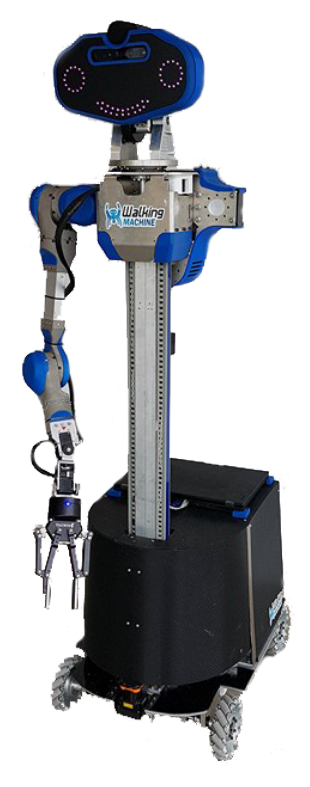
SARA, our creation, was designed for polyvalent human-robot interaction as well as efficient navigation and object manipulation. Our robot is mounted on four mecanum wheels powered by Roboteq drives, has one arm mimicking a normal human arm, and sensors for communication and navigation. Our team has developed knowledge in object and people detection/recognition, as well as navigation using a laser scanner, odometry on the wheels and a Asus Xtion camera. All of these parts are interfaced through ROS (Robot Operating System).
2 Electrical and mechanical improvement
(Section body text.)
2.1 Electrical
As an improvement this year on the electrical side of our robot, we put a lot of efforts in the organization of the electrical systems, we made it much clearer and safer. We put a lot of protection for every sub-system since it's easier to just change a fuse than rebuilding a whole electronic circuit board.
Another big change for us was the battery system. Just before leaving for Japan this year, we changed our custom LiPo battery to a system using common tool batteries. This change has brought way more positive aspects than we expected. First of all, it gives us the ability to ship the robot without the batteries and to bring the batteries in our personal luggage. Which is a big deal when it comes to shipping robots overseas.
Second impact is that this type of battery is way safer and convenient than what we had before. We can simply use the commercial charging station to charge our batteries, this reduces our risk of fire and overcharge. Our onboard dual batteries layout also brings enough charge to power our robot for a decent amount of time and allow us to easily perform live battery swapping without having to shut down the robot.
2.2 Mechanical
Some mechanical improvements were also made this year. There are mainly two things we improved on our robot, the arm, and the base.
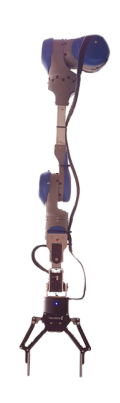
First of all, last year, our arm was made of 5 degrees of freedom, which makes some path plan a little more complicated and sometimes, impossible. Because of that, we decide to add 2 degrees of freedom with 2 dynamixel servo motors. Since then, we have much better results with our inverse kinematic and this also extend our range to get objects that are further.
Next thing we improve was the compactness of our robot base. On our first competition in Germany, we observe that our robot was too large, which caused some problems with our path planning around the doors. By relying on these observations, we decided to reduce the width which improved a lot the navigation capabilities.
3 Software
(Section body text.)
3.1 High-level task planning
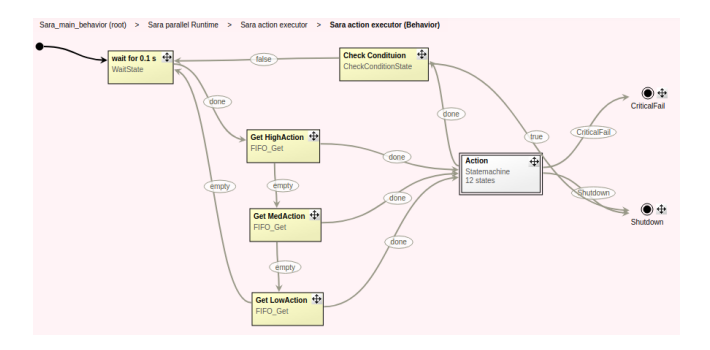
For our task planning, we use a state machine software developed by team Vigir, one of the participants of the Darpa Robotics Challenge. This software, named FlexBe[4], for Flexible Behavior, is a block-based interface for making state machines.
But we do not simply use FlexBe as is. We still need to write our own states using its python API. To simplify our work, we started by splitting all of the Robocup@home scenarios into basic actions. We then identified all of these basic actions our platform could accomplish and we confined them in blocks named States, e.g. MoveArm, MoveHead etc. These blocks can then be assembled together to form a higher level of blocks we named Actions e.g. Pick, LookAt etc. Those Actions can then again be assembled into what we call ActionWrappers. The role of ActionWrapper is to allow interfacing our Actions with our natural language processing software(see natural language processing below). They receive the segmented text and translate it to computer understandable parameters using our Wonderland (see environment reasoning below) knowledge base and other sources of information. This recursive structure allows us to quickly develop our robot's behaviours.
3.2 Natural language processing
To analyze the detected speech, we rely on a software develop by the Semantic analytic group from the University of Roma and the Laboratory of Cognitive Co-operating Robots at Sapienza University of Rome. This speech analyzer, named LU4R[1] for "Language Understanding For Robots", is composed of a server developed in Java which takes as an input the detected sentence and the semantic environment surrounding the robot.
This server communicates through a REST service which gives it the possibility to be compliant with all kind of platform. All you have to do is to launch the server locally which is compiled through a .jar file. Again, this gives the opportunity to use this software on every platform, whether you're on Windows, Linux or Mac. This software gives you the possibility to get different output representation. We choose the amr representation since it was the easiest one to understand and to implement.
We decided to build our own ROS wrapper, lu4r ros to better interface it with our task planning approach. We first translate the answer given by LU4R into the simple format, we call ActionForms. The ActionForms contains an action followed by all of its possible parameters as identified in the FrameNet Index of Lexical Units The ActionWrappers are then fed into a FIFO based priority manager and finally send to our task planner.
What is also interesting about LU4R, it's that it will use the semantic mapping in it's analyzing process. All you have to do is to provide the correct pose for every object in the robot's environment. You can also precise various synonym for every object to get a better understanding of the inputted sentence.
3.3 Object recognition
As a beginning team, we are still exploring various solution around the object recognition problem. Our first plan was to use the object recognition kitchen package from Willow Garage. But after using it in competition, we realized that the performance and the easiness to use wasn't the approach we were looking for. As an alternative, we start using the YOLO[3] (You Only Look Once) ros package.
YOLO is a real-time object detection. It does not only detect various object but it also predicts the bounding boxes of the detected object. It uses a single neural network which is applied to the image. Multiple regions are then created and are used to predict the bounding boxes. Each of them also contains the predicted probability which is used to filter the predicted objects. The advantage of this system is that it can detect multiple objects in a real-time scenario.
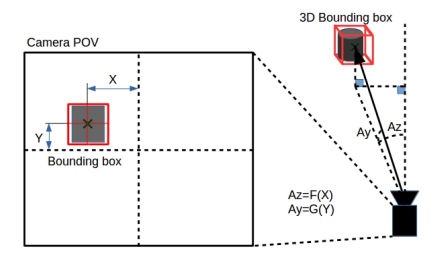
We use the ROS package to make our job easier since this gave us the possibility to directly get the recognized objects output into a ROS topic. We can also get the bounding box for each detected object. First step we had to do was to transform those 2D bounding boxes in 3D to get a specific pose according to our robot.
For the moment, we created the package wm frame to box to approximate the object pose with the depth point at the center of the bounding box. Even though it can have flaws, this technique has also proven to be largely sufficient for most of our applications and most importantly, it uses way less processing power than the full 3D pattern matching we used before. This allows us to do real-time object positioning, a capability we are proud of.
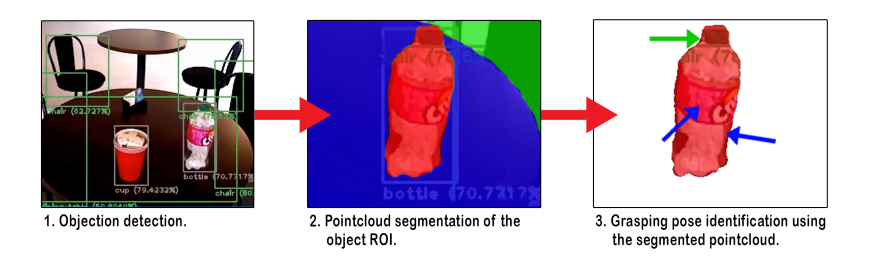
Afterward, to get better results and a better pose, we plan to subtract the point cloud according to the bounding boxes. We will then use it with the pointcloud segmentation from the PCL library to extract the specific object and send it to a grasp identification package like haf grasping. This technique, compared to what we are actually using would give us the possibility to grab a much wider variety of object.
For the moment, we are using the YOLO model but, we are looking forward to training our own dataset, just like we would do in competition. This is new for us but we have all the tools we need to overcome this.
3.4 Navigation
In addition to last year navigation stack, this year we are using the pointcloud to laserscan package as a lighter solution for 3D mapping and obstacle avoidance. This ensures a safe navigation around objects like table or chair since only the legs are detected by the lidar laser. Another great thing about this implementation is the fact that we can set the maximum height for collision avoidance. That way, if there's an obstacle at head level, our robot will avoid it the same way it would with an object on the floor.
3.5 Environmental reasoning
As a novelty this year, we implemented our own solution for an environment representation in a way that we think is simple and easy for everyone. Our package named wonderland is an agnostic system in the same way than LU4R. It's composed of a server that received HTTP query based on a custom API.
The first thing that is needed when you start using this platform is to populate the database. This can be done manually if you already know the object position, but this can be done by your robot through POST query. It's also possible to specify some room with a specific position relates to it. Once this is done, you can call our API and for example, just by doing a GET request on the URL http://wonderland:8000/object, this will return you the list of every object the database contains. It's also possible to filter the request by giving a known color, link to the object or a location as a parameter.
Since the database is hosted as a server, you can access it from everywhere. You could decide to export it to another computer, run it in the cloud or just put it on the robot system itself. It also gives the possibility to have a dynamic knowledge, meaning that the robot can update its knowledge of his environment in real-time.
4 Conclusions and future work
As you can see, despite being a group of undergraduate students, our team is about to catch up with the rest of the league. We've recently put a lot of efforts into stabilizing our platform and fixing as many bugs as possible to give us a strong foot to move forward.
With its new swappable batteries system, object detection network and natural language processing, our robot has become a fully functional autonomous platform allowing us to focus our efforts on the challenges themselves instead of continuously fixing our hardware.
Robot SARA Hardware Description
Specifications for robot SARA are as follows:
Table 1. Robot's hardware description
| SARA | |
|---|---|
| Base | Custom base with fully holonomic platform |
| Right arm | 7 DoF custom arm made of Kinova motors |
| Neck | Tilt and pan unit using two Dynamixel MX-64R servo actuator |
| Head | Custom head made of RGB neopixels leds and Asus Xtion Pro |
| Gripper | Robotiq 2 fingers 140mm |
| Dimensions | Base : 0,61m. X 0,77m. |
| Height : 1,68m. | |
| Weight | ∼60kg |
| Additional sensors Hokuyo UTM-30LX on base | |
| Microphone | Rode microphone |
| Batteries | 2x 20V Dewalt drill battery 5aH |
| Computer | 1x Lenovo p50 with 32GB RAM and nVidia Quadro M2000 4GB, 1x Raspberry Pi 3 |
Robot's Software Description
For our robot we are using the following software:
- Platform: Robotic Operating System (ROS) Kinetic on Ubuntu 16.04
- Navigation, localization and mapping: Gmapping, AMCL, pointcloud to laserscan
- Face recognition: People
- Speech recognition: Google Speech API – Speech comprehension: LU4R, lu4r ros
- Speech generation: Svoxpico
- Object recognition: Darknet with YOLO v2
- Arm control: MoveIt and Kinova API
- Task executor: Flexbe
- World reprensentation: Wonderland
Team members
Jeffrey Cousineau, Philippe La Madeleine, Maxime St-Pierre, Nathalie Connolly, Jimmy Poirier, Léonore Jean-François, Samuel Otis, Redouane Laref, Louis-Charle Labarre, Lucas Maurice, Nicolas Nadeau, Simon Landry, Cheuk Fai Shum, Veronica Romero Rosales, Nicolas Bernatchez, Quentin Gaillot, Raphael Duchaine, Jean-Frederic Boivin
References
- LU4R Project - adaptive spoken Language Understanding For Robots.
- Zhe Cao, Tomas Simon, Shih-En Wei, and Yaser Sheikh. Realtime multi-person 2d pose estimation using part affinity fields. In CVPR, 2017.
- Joseph Redmon and Ali Farhadi. Yolo9000: Better, faster, stronger. arXiv preprint arXiv:1612.08242, 2016.
- Philipp Schillinger, Stefan Kohlbrecher, and Oskar von Stryk. Human-Robot Collaborative High-Level Control with an Application to Rescue Robotics. In IEEE International Conference on Robotics and Automation, Stockholm, Sweden, May 2016.
- Bruno Siciliano and Oussama Khatib, editors. Springer Handbook of Robotics. Springer, 2016.
- Roland Siegwart and Illah R. Nourbakhsh. Introduction to Autonomous Mobile Robots. Bradford Company, Scituate, MA, USA, 2004.
- Tomas Simon, Hanbyul Joo, Iain Matthews, and Yaser Sheikh. Hand keypoint detection in single images using multiview bootstrapping. In CVPR, 2017.
- Shih-En Wei, Varun Ramakrishna, Takeo Kanade, and Yaser Sheikh. Convolutional pose machines. In CVPR, 2016.
- Stephen J. Wright. Coordinate descent algorithms. Math. Program., 151(1):3–34, June 2015.