Tech United Eindhoven Team Description 2010
J. J. T. H. de Best, D. J. H. Bruijnen, R. Hoogendijk, R. J. M. Janssen, K. J. Meessen, R. J. E. Merry, M. J. G. van de Molengraft, G. J. L. Naus, M. J. C. Ronde
Eindhoven University of Technology, Den Dolech 2, P.O. Box 513, 5600 MB Eindhoven, The Netherlands
Abstract This paper describes the research improvements in the mechanical, electrical and software design of the robots of team Tech United Eindhoven. The main improvements are the improved Turtle Remote Control, a new simulator, a global worldmodel, which gathers information from all peers, the incorporation of passing in the game roles, a new pathplanner and minor hardware adjustments. Furthermore the development of a walking platform with 6 legs for the Middle Size League has been started.
1 Introduction
Tech United Eindhoven is the Middle Size RoboCup team of the Eindhoven University of Technology, founded in 2005 and participating in the Middle Size league since 2006. Tech United Eindhoven mainly consists of PhD, MSc, BSc students and staff members from different departments within the Eindhoven University of Technology.
This team description paper is based on the status of Tech United Eindhoven in January 2010 as part of the qualification package for the RoboCup World Championships 2010 in Singapore. First, a brief introduction of the Tech United Eindhoven robot platform is presented. Next, the main improvements compared to [2] are described.
2.1 Hardware
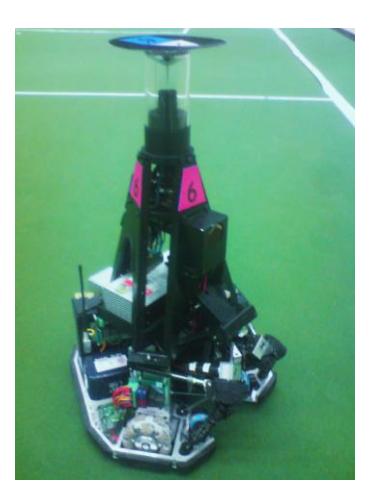
The Tech United Eindhoven robots are called Turtles (acronym for Tech United RoboCup Team: Limited Edition). A picture of the fourth generation robots is shown in Fig. 1 (title page). Power is supplied by two Makita 24 V, 3.3 Ah batteries. Three 12 V Maxon motors, driven by Elmec Violin 25/60 amplifiers, propel the omniwheels. The Turtles have an active ball handling mechanism which enables them to control the ball when driving forwards, while turning and even when driving backwards. The solenoid shooting mechanism, which is powered by a 450 V, 4.7 mF capacitor, provides an accurate and powerful shot. To acquire information on the surroundings, the robot has two cameras, a front camera and an omnivision camera. The high speed front camera can accurately track the ball, and is able to see the ball when it is in the air. The omnivision camera has a 360◦ view which gives information on the positioning and the surroundings. An electronic compass is used to distinct the own side of the field from the opponent side, which cannot be extracted from the vision system, because both sides of the field look exactly the same.
2.2 Data-Acquisition and Software
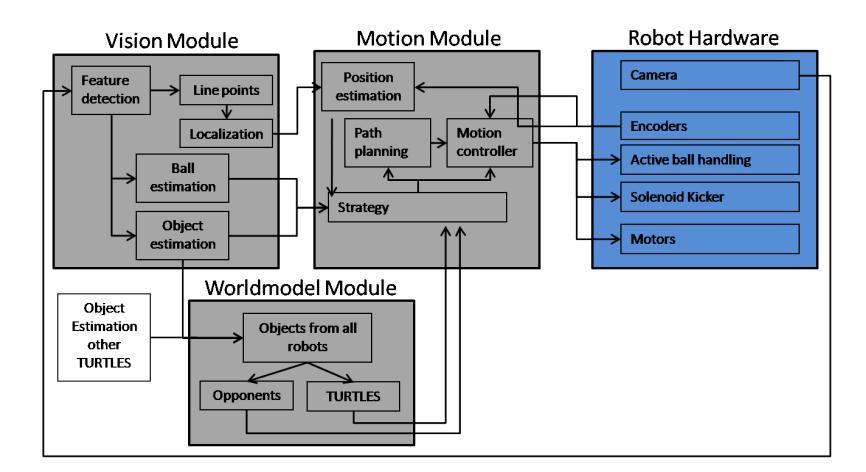
For data acquisition and motion control, the robots are equipped with EtherCAT devices [4, 6], which are connected to the onboard host computer via ethernet. Each robot is equipped with a mini-PC running a preemptive Linux kernel. The robot software is automatically generated from Matlab/Simulink models via the RTW toolbox. In this way, a modular software framework is obtained, see Fig. 2. The software is broken down in three main parts, namely a vision, worldmodel and motion module. The vision and worldmodel modules run at 30 Hz, while the motion module runs at 1000 Hz. The vision module gives the localization, the worldmodel combines information from all Turtles to get an estimation on peer and opponent players and the motion module contains the strategy and the actual motion controllers of the Turtle.
3.1 Hardware
The fourth generation Turtle has proven to be a reliable and robust platform. Therefore the platform that was used last season will also be used this year. The following improvements have been made to enhance the performance of the hardware:
- Communication: A better antenna was placed to improve network communication reliability.
- Ball Handling Mechanism: A few adjustments have been made to the ball handling mechanism, which allows for easy adjustment and makes it more robust.
- Motors: This year the Turtles are equipped with 12 V motors, supplied with 24 V from the amplifiers, which increases the speed of the Turtles.
• Shooting Mechanism: The mechanism for adjusting the height of the shot is redesigned, because it had slip in the drive train. The new design is faster and more reliable and has no slip.
3.2 TRC: the Turtle Remote Control
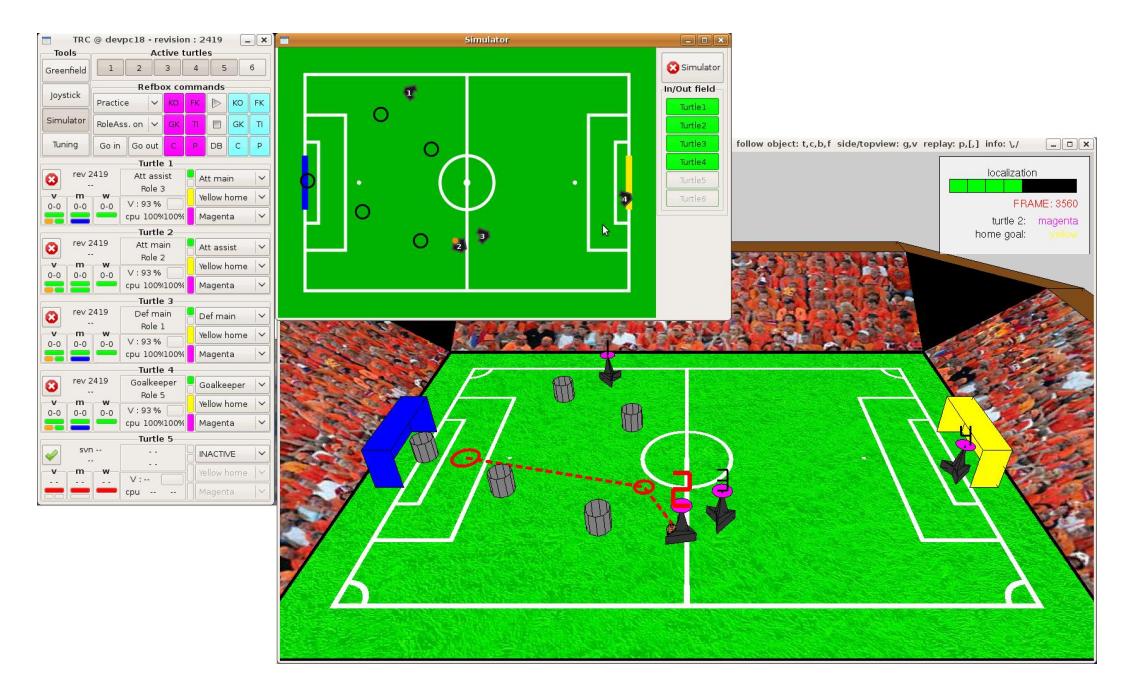
Although robots compete autonomously in the RoboCup competition, control in terms of sending commands as well as monitoring is a prerequisite during development. Previously, graphical user interfaces (GUIs) developed in the MATLAB environment were used for control and monitoring. The major drawbacks of these GUIs were the long startup time and slow operation. To improve the performance of the control and monitoring tools, a new Turtle Remote Control (TRC) GUI is developed using C and Glade/GTK+ [1]. A screenshot including the simulator GUI and Greenfield3D is shown in Fig. 3.
The TRC has a basic view containing buttons to start several tools as Greenfield for monitoring, joystick mode, a simulator, and a tuning tool to adjust several parameters of the software on the robots while the software is running. Additionally, a simplified version of the refbox is included to send refbox commands to the Turtles during testing. Different refbox modes can be selected, which makes the TRC a suitable tool for testing, demonstrations as well as matches. The test mode includes the dual team option which provides the ability to split our robots in two teams that can play against each other, while being controlled by a single tool (TRC). This option provides the possibility to test certain strategies against a realistic opponent. When the match mode is selected the refbox commands buttons disappear and a text viewer appears providing the information obtained from the official refbox.
On the left, information about the three software modules (vision, motion and worldmodel) running on the Turtle is provided as well as information about localization and the ball position. The middle part contains information about the battery, CPUs, the emergency handler, and the current role of the Turtle. Using the right part, a role can be selected for the Turtle as well as the home goal and the team color which can be different for all Turtles when the dual team option is selected.
3.3 New Real-Time Simulator
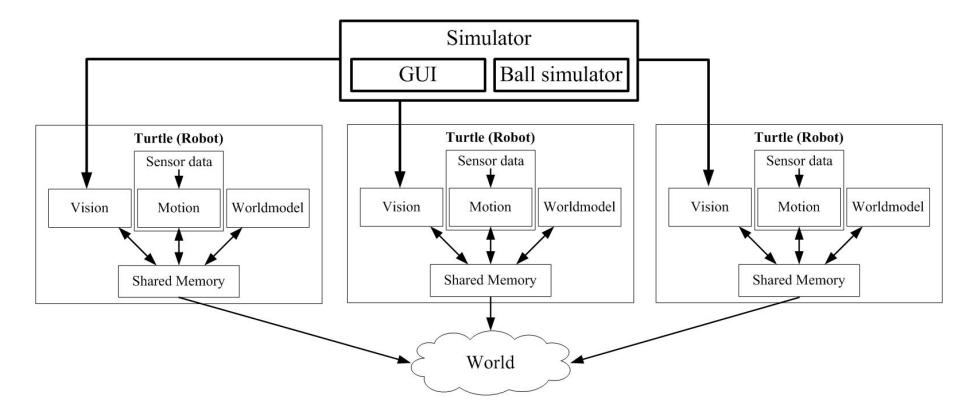
As mentioned in previous sections, the Turtle has three different software modules, vision, motion and World Model, which are responsible for the behavior of the Turtle. In an ideal simulator, several virtual Turtles, i.e. several times these three modules, would run on a single computer to enable an accurate prediction of the real behavior on the field. Therefore, a new simulator has been developed to be able to run the Turtle software on a single development pc as schematically shown in Fig. 4. The Turtle blocks represent virtual Turtles having the same software structure as the real Turtles. In the following subsections, the different parts of the simulator are explained.
Shared memory
The different software modules communicate via shared memory. A part of this shared memory is continuously sent to the other Turtles and the coach pc using UDP communication [3], but without the actual network layer.
Motion, Vision and World Model
The motion module of the Turtle contains all IO with actuators and sensors as well as the strategy. The inputs of this module are all sensor signals. To be able to execute this module on a pc, the physical models of the actuator and the sensor signals should be connected. By measuring the frequency responses of all actuators, the hardware of the Turtle is very well emulated in the simulator.
Initially, the simulator is developed to test strategic decisions of the Turtles. Therefore, the image processing part of the vision module is removed. Future research will be performed to enable simulation of the vision module.
A lite version of the World Model is used in the simulator which simply acquires the obstacle positions from the simulator and sends it to the other modules. Due to the absence of the vision module the measurements of obstacle positions are perfect, which makes clustering and tracking as performed in the original World Model obsolete.
Simulator GUI and Ball Simulator
As can be seen in Fig. 4, the simulator comprises a GUI and the ball simulator. The simulator GUI is the 2D view of the field as shown in Fig. 3. This GUI is a visualization of the Turtle and ball position as well as the tool for user input. Turtles as well as obstacles can be placed and moved in the field by clicking and dragging. The GUI is also one of the inputs for the ball simulator as the ball can be moved using this GUI. The 3D view of the field at the bottom of Fig. 3 is the greenfield3D monitoring tool used during actual matches and can be used during simulation too because the communication, as described before, is in principle the same during simulation and matches. In this 3D viewer, additional information such as targets and way points can easily be monitored.
The ball simulator contains a physical model of the ball and a distance check to objects. Therefore, the ball will bounce to robots and obstacles. Except for the case that the ball is in front of a Turtle and very close, then it will take the ball. When this occurs, a signal is sent to the motion module which will affect the sensor signal of the active ball handling system. This implies, that the motion module is triggered in exactly the same way as during normal operation that the Turtle possess the ball.
Methods
One of the new implementations Tech United has made the last year, is in regard of estimating the global positions and velocities of peer and opponent players. A so-called 'World Model' is implemented. The World Model collects data from the peer players, distinguishes peer from opponent players and gives their positions and velocities.
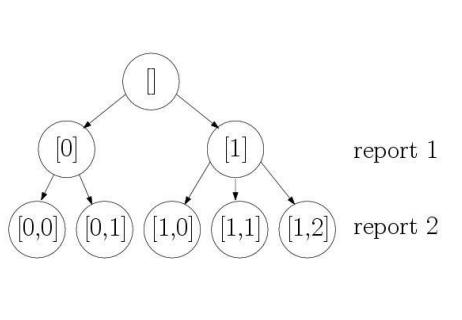
Processing a batch of collected measurements is done by maintaining a hypotheses tree, see Fig. 5(a). When processing the first measurement, or report, several hypotheses are possible. The measurement can either be clutter ([0]) or it can belong to a new observed object ([1]). With the second measurement the hypotheses tree expands to five hypotheses. Then ([0,0]) states that both measurements are clutter, while ([1,2]) states that the the first measurement belongs to object 1, and the second measurement belongs to object 2, etc. After the hypotheses tree is expanded for a certain measurement, the players in each hypothesis are propagated according to a dynamic model, using a Kalman filter for each player present in the hypotheses tree. The probability of each branch in the probability tree is determined and low chance branches are pruned [5].
Results
In Fig. 5(b) the output of the World Model is depicted. In this figure the white dots represent the combined measurements from all team players. The large blue dots represent the tracked team players, and the large red dots represent the tracked opponent players. The World Model will enable better navigation and strategic passes.
3.5 Passing
One of the new additions to the tactics of Tech United for this year is to be able to pass over long distances during regular game-play. The player with the ball determines where the pass should go and which other team player should move to the designated position.
Method
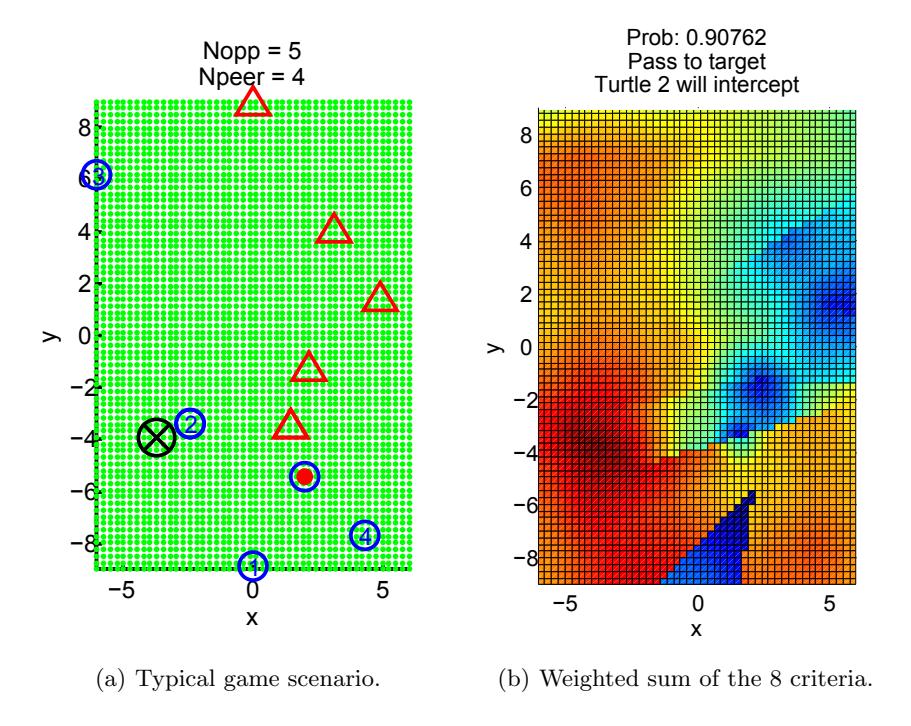
Determining where the pass should go (x,y position) is based on a weighted sum of several criteria, inspired on fuzzy-logic if-then rules
If (x,y) lies behind an opponent, then the chance of a succesful pass is low
The further a point lies behind an opponent the lower the chance will be. A certain geometric function describes this criterion. Other similar criteria, based on opponent, peer and field positions have also been formulated. All criteria are weighted and summed to determine the chance that a pass is successful at point (x,y). Finally the point (x,y) that has the largest chance is selected to be the preferred passing target.
Results
A typical game scenario is depicted in Fig. 6(a), where the positions of the players are placed in an (x,y) grid of the field. In this picture team players are indicated by blue circles, where the one with the red dot inside is the player that has ball possession. Opponent players are indicated by red triangles. The black cross is the passing target, where player number 2 will be selected to intercept the ball at that point, since this player is the closest. The complete weighted sum of the criteria is depicted in Fig. 6(b). The blue area describes the area that is not suited for passing, where the red area describes the area with the best possibility for passing.
Simulations in the new simulator have shown promising results. Dynamic passing, i.e. passing while the peer is still driving to the intercept location, will be included in the capabilities of the algorithm. This will improve the dynamic character of the team play. In the coming months, the algorithm will be integrated with the existing software of the game roles.
3.6 Improved Path Planning
Because the Turtles get in a scrum too often when dribbling, the development of new path planner is started. The Worldmodel makes it possible to plan a path based on information about the position and velocity of the opponents. A two step approach is chosen.
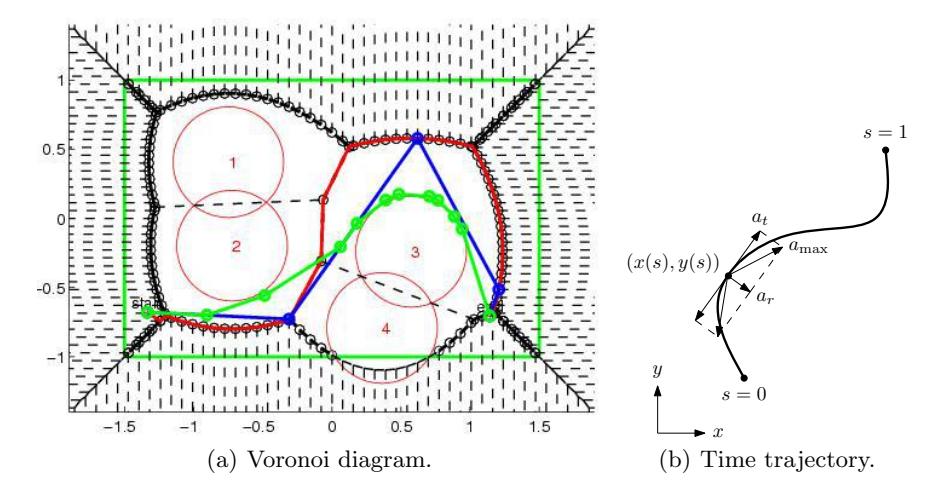
The first step is to select waypoints that lie in such a way that opponents cannot reach the Turtle. The waypoints are selected using a Voronoi diagram, see Fig. 7(a). The numbers represent opponents and the red circles represent the area where they could go in the time that is needed to drive from the start to the end position. The final (green) waypoints are optimal in the sense that it is the shortest path to drive in between the opponents without getting in an area where an opponent can intercept the Turtle.
The second step is to generate a time trajectory to drive along these points as fast as possible, while considering the actuator limitations. To compute a time trajectory that can be used in the motion controller of the Turtle, Bézier curves are used, see Fig. 7(b). By choosing the control points properly, the direction and smoothness at s = 0 and s = 1 can be chosen freely. Kinematic constraints like the maximum acceleration amax, maximum velocity vmax, the initial velocity vb, and the maximum terminal velocity ve can be included easily.
The algorithm has been implemented in C resulting in a calculation time of around 1 ms for a Pentium 4. Because this algorithm for trajectory generation is computationally cheap and straightforward to implement, it can be used for more advanced features such as:
- Interception of a ball with a chosen interception velocity and direction by using a ball position estimator and a bisection algorithm to match the trajectory duration with the ball movement
- Time-to-collision computation by checking the distance of obstacles with points at the generated trajectory such that a replanning or a quick stop can be scheduled in time
- Optimize the control points such that the path improves with respect to e.g. trajectory duration, and object avoidance
3.7 Walking Platform
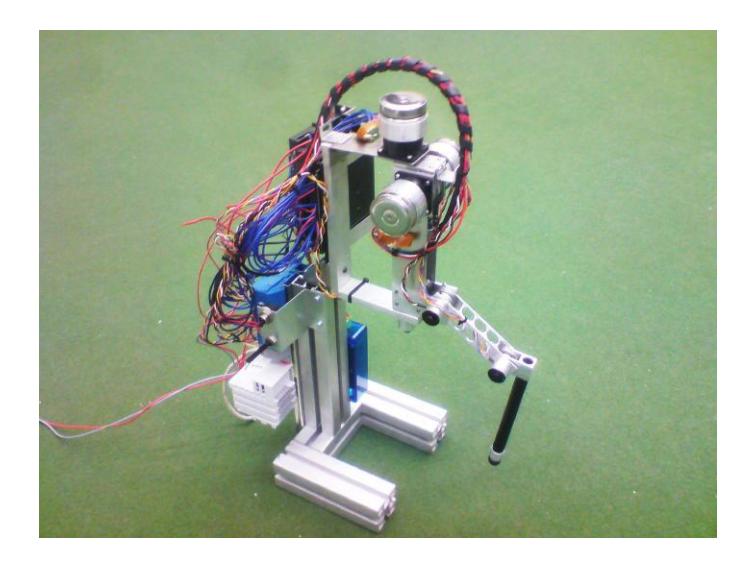
To move towards the goal of 2050 to play against human opponents, Tech United Eindhoven is developing a walking platform, which can move on uneven surfaces such as grass. The robot will consist of 6 legs with 3 degrees of freedom each. In Fig. 8 the prototype of one leg is shown. The three degrees of freedom are driven by three motors using a cable system with integrated springs. This results in a compliant device that can walk over uneven surfaces and the leg itself can be lighter compared to motors at the different joints. Integration of the hardware and developing control algorithms remain points of further research. The design will be compliant with the Middle Size League rules and size limitations. The goal is to have the walking robot on the field during the matches at the German Open 2010 and the World Championship in Singapore 2010.
4 Conclusions
Compared to the situation described in the previous team description paper, Tech United Eindhoven has advanced significantly. The improved software tooling such as the Turtle Remote Control and the new simulator enable easy testing, both in a simulation environment and in real experiments. The global World Model gives a Turtle better information on peer and opponent locations and velocities, because the information from all other Turtles is combined. This makes tactical passes possible during the referee tasks as well as during normal gameplay. The improved pathplanner will anticipate on opponent movements, which will often prevent scrums. A few hardware adjustments also improve the reliability and robustness of the platform. All new developments together should yield an improved game performance, at least matching and hopefully improving last years' results in the RoboCup Middle Size league.
The research done on the walking platform is a first step towards soccer on irregular surfaces such as grass. In the future, it could bridge the gap between the humanoid and middle size league, which could be beneficial for the development of the Middle Size League and possibly for the RoboCup project as a whole.
References
- Glade a user interface designer, http://glade.gnome.org/.
- W. Aangenent, J. de Best, B. Bukkems, F. Kanters, K. Meessen, J. Willems, R. Merry, M. v.d. Molengraft, Tech United Team Description 2009.
- J. A. et al., Cambada 2008: Team Description Paper, RoboCup, 2008.
- D. Jansen, H. Buttner, Real-time ethernet the EtherCAT solution, Computing & Control Engineering Journal 15 (1) (Feb.-March 2004) 16–21.
- H. J.Schubert, Sequential clustering with particle filters Estimating the number of clusters from data, Proc. 8th Intern.Conference on Information Fusion.
- S. Potra, G. Sebestyen, EtherCAT Protocol Implementation Issues on an Embedded Linux Platform, Automation, Quality and Testing, Robotics, 2006 IEEE International Conference on 1 (May 2006) 420–425.