Zenit-NewERA Team Description
Lev Stankevich, Alexei Kritchoun, Anton Ivanov, Sergey Serebryakov
NE Joint-Stock Company 21, Partizanskaya st., St. Petersburg, 195248, Russia
Abstract MAS researches and development, realizing ideas of the distributed data processing and learning, are the key features of the artificial intelligence framework. Nowadays MAS is widely used for modeling and controlling of the objects with strategic and tactical behavior. RoboCup, especially Simulation League, is the excellent environment for such researches. In this paper we present brief description of Zenit-New ERA RoboCup Simulation League team, mostly focusing on the new feature of our team – scenarios implementation.
Introduction
Zenit-New ERA RoboCup Simulation League team development started at 2001. The team has been participating in RoboCup competitions since spring '2002 (under ERA-Polytech name). We mainly focused our research to high level procedures (defense and offense) and inter-agent cooperation.
The team code was initially based on CMUnited'99, but by now only CMU's world model is used in the code.
During development we understood that it's really difficult to create a module able to make "right" decisions in all situations player meets in the game. Thus, we decided to develop several little modules, which make decisions in local situations, and combine them into one technique, called scenarios.
Dynamic formations
The agent behavior without ball is the very important and complex task. Efficiency of defense and offense depends on realization of this behavior.
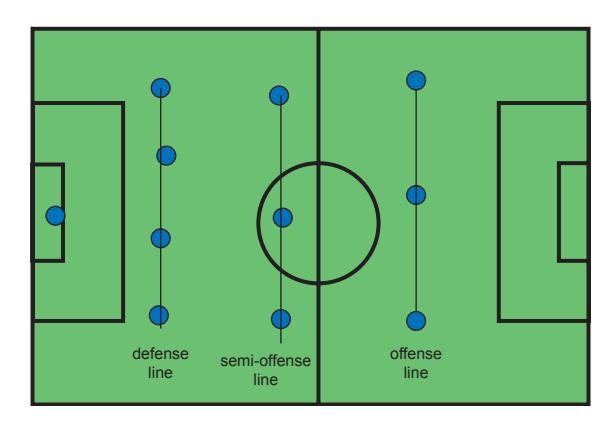
The principle of dynamic formations is the basic principle of our team. The players dispose themselves among three vertical lines: defense line, semi-defense line and offense line (see Fig. 1). These lines dynamically change their X coordinate due to game situation, ball position and opponents players position (to avoid offside and to create artificial offside).
The formula for ball-depended line x coordinate calculation:
$$newX = def_pos + \frac{(att_pos - def_pos)(ball_x + SP_pitch_length/2)}{SP\ pitch\ length}$$
- new X new line x coordinate,
- def pos defense line x coordinate,
- att pos offense line x coordinate,
- ball x ball x coordinate,
- SP_pitch_length pitch length.
Then this value is corrected to avoid or to make the offside.
Also each line has speed parameter. All players on a line move with the same speed, not overtaking each other and not lagging behind. Also we can control players' stamina changing this speed. Coordination mechanism is very important in this approach - the players should change the value of the speed on the same value at the same time. The changing of the speed happens when players change the behavior mode - defense or offense. In defense mode the speed of the offense line decreases, that allows attackers to have a rest before the next attack, and when in offense mode, the speed of the defense line decreases, that allows defense players to have a rest.
Formations are represented by 3-digit numbers: the 1st digit is number of defenders, the 2nd is number of midfielders, and the 3rd is the number of offending players. Our team supports small number of the formations: 433, 532 and 334, but it's quite sufficient for our goals. Formation 433 is the default formation. The players start the game with this formation. It is necessary to achieve the game improvement by changing the formation from one to another. The problem is that the players can change formation not at the same time and to the different formations. To solve this problem, the team changes the formation at the moments when game globally changes. It is obvious that one of such global parameters is the score of the game. Thus it is possible to develop an algorithm: If we miss too much (assume more than one per minute), all team simultaneously changes its formation to 532, if we score much (assume more than one per minute), it is possible to change the formation to attacking 334. Otherwise we leave current formation (by default 433).
Scenario implementation
(This section contains subsections)
Scenario definition
Formally scenario can be represented by the following set:
$$Sc = \langle N, P, I, T, St \rangle$$
where,
- − N scenario name, each scenario must have unique name;
- − P scenario priority (when more than one scenario can be executed, the scenario with the maximum priority is chosen);
- − I scenario start condition;
- − T agent's involvement condition into scenario (each agent in scenario has its unique number);
- − St set of steps, including all possible agent's actions in scenario, conditions of advantage to other steps, scenario stopping condition.
In every simulation cycle the agent checks start conditions of all known scenarios. For each agent involved into the scenario, agent's involvement condition must be true. This condition is concerned agent's position inside some area on the field. If the involvement condition is false for any agent then scenario is considered failed to execute. Only when both the conditions I and T are true, the scenario is considered as potential scenario that can be executed, and it is placed into a list. Afterwards, the agent chooses the scenario with maximum priority. When scenario starts, a mapping of players' uniform numbers to internal scenario numbers occurs. This allows creating scenarios independent on involved agents' uniform numbers. Besides, a special message to other teammates is sent during scenario initialization. This message contains the information about started scenario.
Scenario start condition may contain several conditions, interconnected by the logical operations "or", "and" and "not". The following conditions are allowed:
- − The ball is situated in concrete field area.
- − The fastest teammate to the ball is the teammate with given role (right midfielder, central forward and so on).
- − The fastest teammate to the ball is the teammate with number N, given in scenario during initialization.
- − Some field area contains players with given roles. The number of players lies in range [min, max].
- − Some field area contains players with specified numbers. The number of players lies in range [min, max]. The numbers are the internal scenario numbers for teammates, and uniform numbers for opponents.
Involvement conditions is IT = Number, where Number is the internal player's number in the scenario and IT is one of the following:
- Area the agent, placed on this area, is involved into scenario.
- Role the agent with this role is involved into scenario.
- Role-area –the agent with this role, placed on given area, is involved into scenario.
Step is the set of the parameters:
$$St = \langle N, Wb, Nb, Lc \rangle$$
where
- − N the unique step name for considered scenario; Wb – the set of the actions for player with ball, e. g. to pass the ball to specific teammate, or to dribble to specific area, etc. The action can be zero action (none). In this case, the agent acts as not involved into scenario.
- − Nb the set of actions for players without ball. The following actions are possible:
- To move to the center of some area,
- To mark first opponent from the given set,
- Zero action. In this case, the agent just turns to ball.
- − Lc the condition of advantage to other steps. The conditions are written the following way:
if condition goto step
If the condition is true, specified step is executed.
There are some other scenario termination conditions that agent checks every simulation cycle by default. The agent stops the scenario execution if it doesn't know own or ball position, or if the game is not in play_on mode (corner kick, side kick etc). If the agent is in defense mode, then it doesn't check scenario starting conditions. At every cycle the agent without the ball checks 2 conditions: If the fastest player to the ball is surely opponent or the teammate not involved into scenario, then agent leaves scenario.
Communication in the scenario
During the scenario execution the special communication mechanism is used. Only players, involved into scenario, are allowed to communicate with each other. The fastest player to ball reports about ball position and velocity. The players without ball report about own positions and positions of opponents.
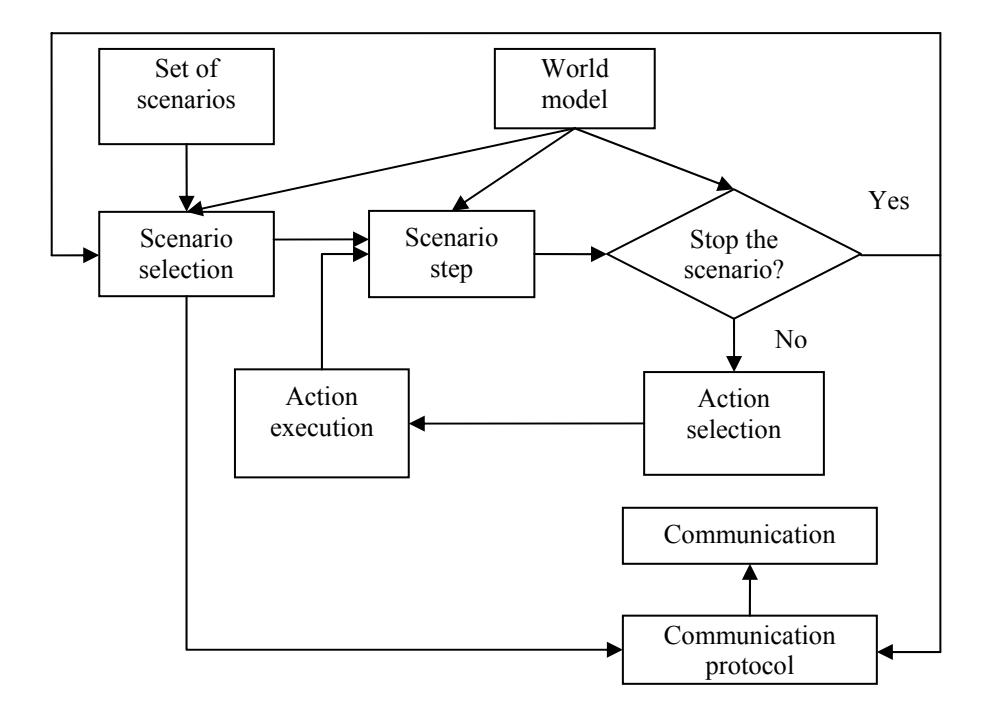
Fig. 2 shows the scenario execution diagram.
According to the diagram, first agent checks the scenario start conditions. If some scenario has been chosen, the agent selects scenario step. Then, the stop condition is checked. If the scenario must be stopped, the special message is sent to inform other agents involved into scenario. Otherwise the agent checks whether it is in the scenario process, and if it is true, the set of possible action for scenario is chosen. Afterwards, the agent selects and executes the action from the set. Next agent's cycle begins with determining the scenario step.
Scenario example
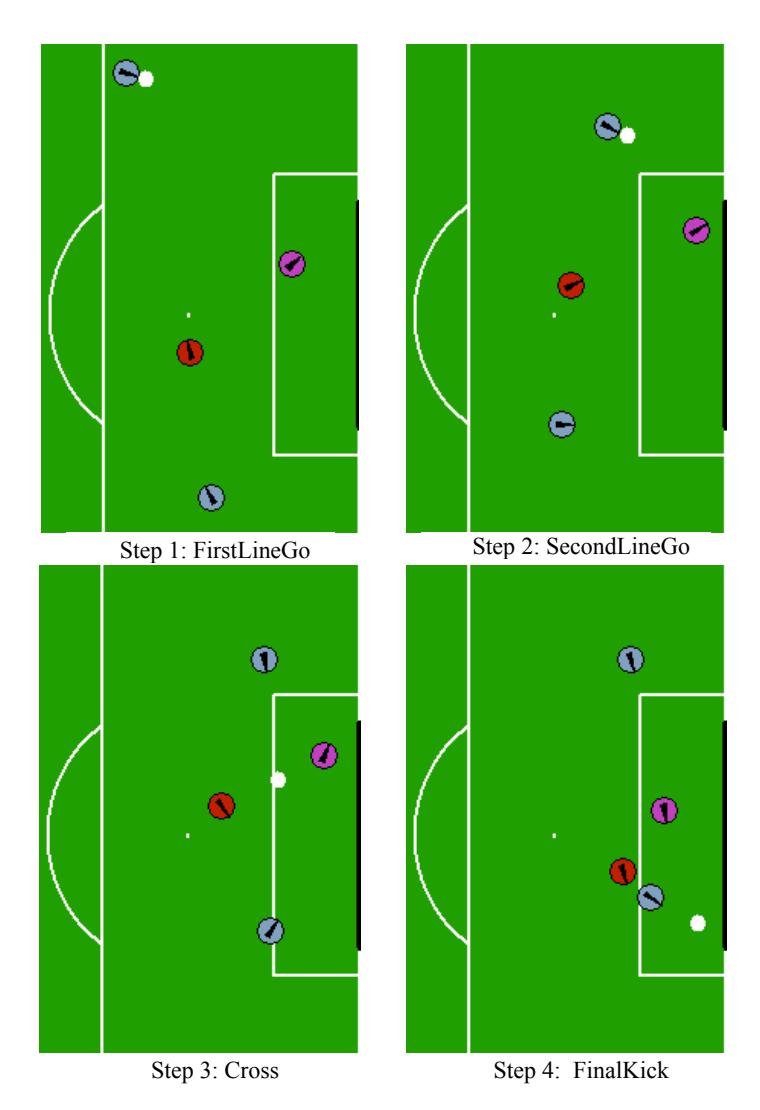
This section describes an example of the scenario for 2 players attacking opponent goal in penalty area.
The first line defines the scenario name and its priority.
Scenario: "Parallel_lines_right" 1.0
Next line defines the involvement conditions. Two players are defined. The first player must be situated not far than 5 meters from the ball, and the second one must be situated inside given rectangle:
Init_teammates: (circle Vector(ball) 5.0) =1 #with ball
 (rectangle Vector(30.0,-20.0) Vector(45.0,0.0))=2
Next line describes the scenario start condition. The condition consists of two simple conditions, connected by logical operation AND. The first condition defines ball position, and the second one defines that there must be no opponents inside circle with radius 3 meters.
Init_scenario:
 (and (bpos (rectangle Vector(30.0,0.0)
 Vector (52.0,20.0)))
 (opp {All} 0 0 (circle Vector(45.0,-7.0) 3.0))
)
"Steps" keyword starts the scenario steps description. The first step has the name "FirstLineGo":
Steps:
 "FirstLineGo"
First, the actions for player with the ball are defined. The player checks, whether he can shoot to the goal, and if not, he dribbles to given point:
Ball_owner: (ballto Vector(45.0,10.0) {score dribble})
Then, the conditions for player without the ball are defined (line number 2). His goal is to move to a certain position on the field:
No_ball:
 2: (pos Vector(40.0,-7.0))
Afterwards, the advance condition is defined: if the ball appears inside some rectangle, the scenario advances to step "SecondLineGo".
Leave_conditions:
 if (bpos (rectangle Vector(43.0,-20.0)
 Vector(52.5,20.0)))
 goto "SecondLineGo"
Second step has one more condition for player with ball. This condition is checked, if the first two actions fail: the ball can be kicked out to the point, where the player 2 is situated.
"SecondLineGo"
 Ball_owner: (ballto Vector(45.0,10.0) {score hold})
 (ballto Vector(our,2) {clear})
For the second player the movement to the position is defined. The position depends on ball coordinates.
 No_ball:
 2: (pos Vector(-1.0,0.0 Vector(ball_x,-7.0)))
For the second step two advance conditions are presented. The first is that the player 2 is situated inside some circle with radius 4 meters. The second one is that the fastest player to ball is the teammate 2.
 Leave_conditions:
 if (our {2} 1 1 (circle Vector(ball_x,-7.0) 4.0))
 goto "Cross"
 if (bowner 2) goto "FinalKICK"
In the third step player with ball tries to shoot the ball to the opponent's goal. If this is impossible, he crosses the ball along goal.
"Cross"
 Ball_owner: (ballto Vector(ball_x,-7.0)
 {score clear})
For the second player the actions are the same as in previous step:
No_ball: 2: (pos Vector(-1.0,0.0 Vector(ball_x,-7.0)))
The advance condition repeats the condition of the second step:
Leave_conditions: if(bowner 2) goto "FinalKICK"
In the fourth step player tries to shoot the ball to the opponent goal. If he can't do it, he kicks the ball to goal corner:
"FinalKICK"
 Ball_owner:
 (ballto Vector(52.5,6.5) {score clear})
Now, there's no actions for the player 1 (without ball). He just watches the ball:
No_ball: 1: none
Fig. 3 illustrates the described scenario steps.
The scenarios help the team to improve the team coordination. In the future we'll going to expand scenario language to get more flexibility in scenario writing. Besides, we're going to include a number of scenarios into scenario base. We believe that it will greatly increase team performance.
Conclusion
In this paper we presented the brief description of the Zenit-New ERA RoboCup simulation team. As our new developed system is the scenarios, the main part of this paper is scenario implementation description. The scenario technique shows good results. We played a huge number of the games against our old team, and our new team was able to win with result about 20-0. In the future we're planning to increase the number of the scenarios and to use reinforcement learning technique in the scenarios.