FCP_GPR_2019 Team Description Paper
João Alberto Fabro, Álefe Felipe Gonçalves Pereira Dias, Luis Paulo Reis, Nuno Lau
LASER Advanced Robotics and Embedded Systems Lab., Federal University of Technology – Paraná (UTFPR), Curitiba, Brazil; LIACC Artificial Intelligence and Computer Science Lab., University of Porto, Portugal; IEETA, UA Inst. Eng. Elect and Telematics of Aveiro, University of Aveiro, Portugal
https://rcsoccersim.github.io/ · https://github.com/rcsoccersim/rcssserver/releases · https://github.com/rcsoccersim/rcssmonitor/releases · https://github.com/rcsoccersim/rcsslogplayer/releases · https://archive.robocup.info/Soccer/Simulation/2D/ · https://archive.robocup.info/Soccer/Simulation/2D/binaries/RoboCup/2018/HELIOS_SS2D_RC2018_BIN.tar.gz · https://osdn.net/projects/rctools/releases · http://www.prokopenko.net/gliders2d.html · http://www.sourceforge.org/projects/fcportugalsetplays · http://www.sourceforge.org/projects/fcportugalsetplaysagent2d · http://www.sourceforge.org/projects/fcportugalSPlanner
Abstract FCP_GPR brings together effort of researchers from Brazil and Portugal, in a continuous effort to develop strategies and evolutions for the Simulated Soccer in Robocup. FCPortugal (FCP) have been participating since 1999 in soccer simulation categories, being the 2000 world champion in the 2D simulation category. GPR2D Team is from the Federal University of Technology - UTFPR, and is participating in simulation competitions since 2009, winning Brazilian 2D competition in 2011, and participating actively on Robocup since 2012. Since 2014, both research teams joined forces and formed FCP_GPR, releasing a set of tools to integrate setplays (or set pieces) to soccer playing agents (see SourceForge.net project fcportugalsetplays). This TDP presents a detailed description of the all the steps necessary to install, and execute matches between FCP_GPR, and two other base teams: the well known Agent2D and the also recently released Gliders2D.
1 - Introduction
FCP_GPR is a joint research effort in 2D soccer simulation, that brings together efforts from FCPortugal [1] and GPR-2D [2]. FCPortugal (FPC) is a research group from Portuguese research centers at the universities of Porto (LIACC - Artificial Intelligence and Computer Science Lab), Minho (DSI - Information Systems Department), and Aveiro (IEETA – Institute of Electrical Engineering and Telematics). FCPortugal research group has participated of Robocup since 1999, in various leagues, both simulated and real (Soccer Simulation 2D and 3D, Small Size, Humanoid Standard Platform with both Aibo and Nao robots, and Medium Size League). Among the results of FCPortugal are the championship of 2D Simulation in 2000, championship of 3D simulation in 2006, and championship of Middle Size League in 2008. The main contributions of FCP includes research in coordination and cooperation among agents. GPR-2D is the simulation team from the Robotics Research Group (that stands for "Grupo de Pesquisas em Robótica" in Brazilian Portuguese language) at Federal University of Technology – Paraná - Brazil - (UTFPR). Since 2009, this team participated in Brazilian, Latin-American and World Robocup competitions, winning the Brazilian national competition in 2011. Since 2014, these two research groups joined efforts, creating the FCP_GPR team. One of the results of the joint effort is the publication, as free software, of a complete set of tools to allow any team to define and execute predefined, "rehearsed" plays (also know as setplays) [3] [4] [5] [6] [7]. This TDP is focused on presenting a detailed description of the all the steps necessary to install, and execute matches between the recently released FCP_GPR_2019 source code, and two other base teams. Section 2 briefly presents the installation steps to setup the Robocup Server, Monitor and LogPlayer, and also how to install and execute two base teams: Agent2D [8] and the recently released Gliders2D [9]. Section 3 presents the installation instructions of FCP_GPR_2019, and Section 4 presents some results of experiments.
2. Setting up the Soccer Server in order to simulate plays
The Robocup 2D Soccer Server official site is https://rcsoccersim.github.io/. This tutorial section is intended at filling a gap in the documentation, since this site does not provide complete installation instructions for the server and some sample (base) teams. The steps were tested on Ubuntu 16.04 (64 bit), since this distribution is (as of 2019) the standard one used in the competitions, and also on Ubuntu 18.04 (64 bit) that might became the new standard for 2020. Your system installation language must be English. If it is not, you should run the command export LC_NUMERIC="C" on a terminal each time you use the server.
First of all, there are libraries that have to be installed in order to compile both the soccer server, soccer monitor and log player. The command, that should be executed on a linux terminal, is:
sudo apt-get install build-essential g++ autoconf automake libtool flex bison libboost-all-dev libglib2.0-dev libqt4-dev libfontconfig1-dev libxrender-dev libxi-dev libice-dev libsm-dev libpng12-dev libxt-dev libaudio-dev libqt4-opengl libqt4-opengldev libqt4-network libfreetype6-dev libxext-dev zlib1g-dev
After that, please inform the password of the user for installation (that user should be in sudoers - usually all installations should be done by the user whose password is set during the Ubuntu installation). The Soccer Server main repository (the latest version of it), from where the source code should be obtained, is https://github.com/rcsoccersim/rcssserver/releases. At the time of writing, the latest version is 15.5.0 (Sept 3, 2018). Download the file rcssserver-15.5.0.tar.gz (or the latest release) in any folder (usually Downloads). After that execute the following commands in a terminal window, after changing to the "Downloads" folder with the command "cd Downloads":
tar xzvf rcssserver15.5.0.tar.gz
cd rcssserver15.5.0
./configure
make
sudo make install
If you have any problem in the second step above, execute sh ./configure instead. After the last command, again the installation password might be requested. In order to install the "Soccer Monitor", that is the program that allows the "watching" of the games, go to https://github.com/rcsoccersim/rcssmonitor/releases, download the file rcssmonitor-15.2.1.tar.gz(or the latest release) in any folder (usually Downloads). After that, again in a terminal, execute the following commands (also after "cding" inside the "Downloads" folder):
tar xzvf rcssmonitor15.2.1.tar.gz
cd rcssmonitor15.2.1
./configure
make
sudo make install
Do the same for the "rcsslogplayer" (program that can be used to view past plays, from their logs). Download rcsslogplayer-15.2.1.tar.gz from https://github.com/rcsoccersim/rcsslogplayer/releases.
tar xzvf rcsslogplayer15.2.1.tar.gz
cd rcsslogplayer15.2.1
./configure
make
sudo make install
After installing these 3 programs, it is possible to start the "RoboCup 2D Soccer Simulation(rcss)" server and monitor, with the command "rcsoccersim" in any terminal, that will automatically execute both the rcssserver and rcssmonitor. But in order to really be able to execute a play, it is necessary to have at least 2 teams to play the match (and start all 11 players and coach of each team). Each team is composed of 12 "executing processes", each is an implementation of a "client" for the server. One very basic example of such "client" implementation is provided with the server (file "client.cpp" insider src folder of the rcssserver), but nowadays a lot of team use the base provided by the Helios Team [8], called "Agent2D".
The teams binaries from each past competition are available at the "Robocup Archive", and can be downloaded and executed, directly from https://archive.robocup.info/Soccer/Simulation/2D/. You can download the binary executable scripts, and execute them directly in your machine (given that your version of Linux is compatible, and all the necessary libraries are installed). Nowadays, the Ubuntu 16.04 64 bit Linux distribution is the "default" distro, but older teams may only be executable on older versions of Linux. In order to download and execute the teams binaries, just download and expand the team, and then execute its "start" script to load all the players and coach (for example, to execute 2018 year's champion, HELIOS, just download https://archive.robocup.info/Soccer/Simulation/2D/binaries/RoboCup/2018/HELIOS_SS2D_RC2018_BIN.tar.gz from the repository, uncompress all the files and execute the "./start.sh" script). Usually after unpacking, the files lose their "executable" permission, so just restore their execution permission with the following commands:
chmod +x start.sh
chmod +x helios_coach
chmod +x helios_player
After doing this with 2 different teams, the "players enter the field" and then you can command the start of the game from "rcssmonitor" by executing the "KickOff" command from the "Referee" menu (or just press Ctrl+"K").
Section 2.1 – Installing the base client Agent2D 3.1.1
In order to install Agent2D, it is first necessary to install the "librcsc" (library for RoboCup Soccer Client). The latest version is available at the RCTools site: https://osdn.net/projects/rctools/releases. The installation procedure is similar to all the other RoboCup Soccer 2D programs: Download and uncompress the file to a folder, then type the following commands at a terminal, inside this folder:
tar xzvf librcsc4.1.0.tar.gz
cd librcsc4.1.0
./configure
make
sudo make install
After that, execute the "almost" same procedure to download/compile the source code for Agent2D, except that the last command is not necessary, since this "client" does not need to be "installed" in the system, just executed while the server is also executing:
tar xzvf agent2d3.1.1.tar.gz
cd agent2d3.1.1
./configure
make
After that, just execute "./start.sh" in each team folder and this team will "enter the playfield", as can be seen in the rcssmonitor window (don't forget to start the server and monitor with rcsoccersim on another terminal, as this program "freezes" the terminal, usually you would need three active terminals, one for the server/monitor, and one for each./start.sh from each team.) In the RCTools site there are also other interesting projects, such as "SoccerWindow2" (another log viewer) and Fedit2 (a formation editor).
Section 2.2 – Installing the base client Gliders2D 1.6
Another base code, recently released, developed with an incremental evolutionary approach on Agent2D, is Gliders2D [9], provided by the Gliders team, that won Robocup 2016 http://www.prokopenko.net/gliders2d.html. The installation procedure is very similar to Agent2D (needing also the librcsc installation, but once that library is installed on the system, it can be used by all the teams). Version 1.6 of this base code always win against Agent2D, with an average score of 4:1.
3. Installing the base client FCPGPR and the Setplay Framework
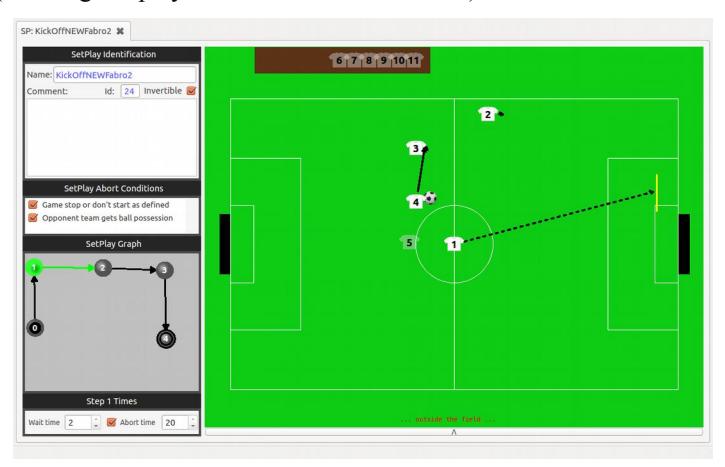
Setplays, or set pieces, are plans used by teams from various sports, such as soccer. The main reason to use such predefined sequences of actions is to surprise the opposing team by executing a set of movements that have been previously accorded among the players. Setplays can be started in several game situations, such as corner kicks, or faults. The FCPortugal team developed and published as free software a specification language for soccer Setplays (The Setplay Library [6]), that is in use in various Robocup categories, such as Simulation 2D, 3D, and Middle Size League. A graphical program to specify and adjust setplays, called Strategy Planner (SPlanner) [7] is also available. In order to include setplay capabilities on any "Agent2D" based team, a complete example team was developed [8]. Figure 1 shows a graphical interface screen that allows editing the moves (SPlanner) [7], showing an example of steps in sequence, represented in the form of a graph, and a graphic representation of the play (showing the players and the ball in the field).
3. Preliminary Results
FCP_GPR continuously seeks to evaluate the advantages of using pre-defined plays (setplays or set-pieces) in soccer for Robocup. In simulations against Agent2D 3.1.1 (100% of wins over 100 games), and Gliders2D 1.6 (50% of wins over 100 games) the results show that the team has potential, and the use of setplays should be better evaluated and developed. Against Helios2018 [10], winner of the last Robocup, the team is able to score, but not to win, indicating that more experiments should be performed with the proposed approach, to make it more competitive. As a final remark, there is an option that can be set in the file ~/.rcssserver/server.conf, on line 265: server::synch_mode=false can be changed to server::synch_mode=true. This alteration allows the server to execute on the "maximum speed" allowed for the system running the simulations, that in modern computers can make a complete game be executed in less that 2 minutes, instead of the regular 10, and can have great impact in simulations. Logfiles options also should be set as following to save storage space: game_log_version=5, game_log_compression=1, text_log_compression=1.
Acknowledgements
We would like to acknowledge the Robocup community for its support, specially teams Helios [8] and Gliders [9] for the excellent contributions and code release.
References
- Lau, N.; Reis, L. P.; Mota, L.; Almeida, F. FC Portugal 2D Simulation: Team Description Paper, online, available at: http://staff.science.uva.nl/~arnoud/activities/robocup/RoboCup2013/Symposium/TeamDescriptionPapers/SoccerSimulation/Soccer2D/, consulted on Jan/2019.
- Neri, J.R.F.; Zatelli, M.R.; Farias dos Santos, C.H.; Fabro, J.A.; A Proposal of QLearning to Control the Attack of a 2D Robot Soccer Simulation Team, 2012 Brazilian and Latin American Robotics Symposium (SBR-LARS), pp.174-178, 16-19 Oct. 2012.
- Mota, L.; Reis, L.P.; An Elementary Communication Framework for Open Co-operative RoboCup Soccer Teams, in Sapaty P; Filipe J (Eds.) 4th Int. Conf. on Informatics in Control, Automation and Robotics - ICINCO 2007, pp. 97-101, Angers, France, May 9-12, 2007
- Mota, L.; Reis, L.P.; A Common Framework for Cooperative Robotics: an Open, Fault Tolerant Architecture for Multi-league RoboCup Teams, Int. Conf. Simulation Modeling and Progr. for Aut. Robots (SIMPAR), Springer, LNCS/LNAI series, pp. 171-182, Nov, 2008.
- Mota, L.; Lau, N.; Reis, L.P.; Co-ordination in RoboCup's 2D simulation league: Setplays as flexible, multi- robot plans, 2010 IEEE Conf. on Robotics, Automation and Mechatronics, RAM 2010, pp. 362-367.
- Mota, L. ; Fabro, J. A. ; Reis, L. P. ; Lau, N. Collaborative Behavior in Soccer: The Setplay Free Software Framework. In: The 18th annual RoboCup International Symposium, 2014.
- Cravo, J.; Almeida, F.; Abreu, P.H.; Reis, L.P. ;Lau, N; Mota, L. Strategy Planner: Graphical definition of soccer set-plays, Data & Knowledge Engineering 94, pp. 110-131, Nov. 2014
- Akiyama, H. Helios RoboCup Simulation League Team, online, available at: http://rctools.sourceforge.jp/pukiwiki/, consulted on: Jan/2019.
- Prokopenko, M.; Wang,M. Gliders2d: Source Code Base for RoboCup 2D Soccer Simulation League, Arxiv Preprint, online, available at: https://arxiv.org/abs/1812.10202, consulted on: Jan/2019.
- Nakashima, T.; Akiyama, H.; Suzuki, Y.; Ohori,A.; Fukushima, T.. HELIOS2018 Team Description Paper (TDP for Robocup 2018), online, Available at: https://archive.robocup.info/Soccer/Simulation/2D/TDPs/RoboCup/2018/HELIOS_SS2D_RC2018_TDP.pdf, consulted on: Jan/2019.