The magmaOffenburg 2010 RoboCup 3D Simulation Team
Klaus Dorer, Mathias Ehret, Stefan Glaser, Simon Raffeiner, Srinivasa Ragavan, Thomas Rinklin, Rajit Shahi, Ingo Schindler
Hochschule Offenburg, Elektrotechnik-Informationstechnik, Germany
Abstract This paper describes the magmaOffenburg 3D simulation team trying to qualify for RoboCup 2010. While last year's TDP focused on decisions making using extended behavior networks and on its software architecture and implementation in this year we describe the tool set that was created for RoboCup 3D. It contians a GUI for agentand world state visualization, for evaluation of localization algorithms and benchmarks in general, a visual editor for Extended Behavior Networks creation and debugging, a live movement tool to interact with the joints and finally a tool for editing behavior motor files.
1 Introduction
This year our team description paper describes the toolset created for 3D simulation. Experience from previous times in 2D simulation shows that competitive team play is only achieved with special purpose tools for analyzing and developing agents. The following sections describe our agent GUI, benchmark tool, EBN development kit, Live-Movement-Tool and motor file editor.
2 Agent GUI - Debugging Tool
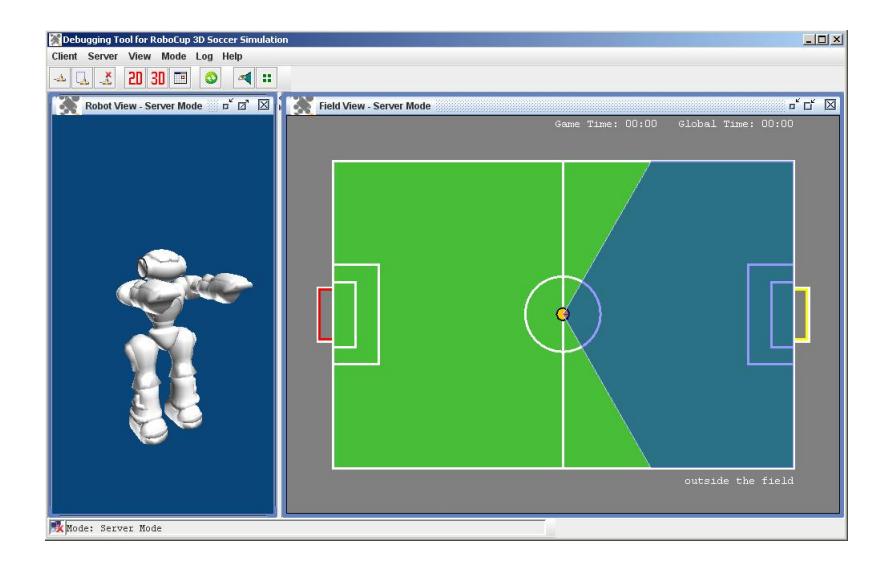
The Agent GUI is a basic agent visualization tool that allows to see the agent's behavior in both 2D and 3D view perspectives. During desing and debugging time the views allow to visualize the agent's world model (2D) and the agent's model of its own (3D). The developers can thus see the action graphically, assess the performance of their agents in development and make necessary implementations to improve.
Each instance of the Agent GUI is itself the agent playing in the field. In 2D view, the agent can be seen in action in the field. In this view perspective, one can see the Agents position in the Field, the field of vision of the agent, the position of ball plus other useful information.
In 3D view, the agent's own impression of being a NAO robot can be seen with the movement of its joints.
The GUI can be used in online and offline mode. In online mode, the GUI is connected with the Simspark server and while the game is running, all the actions can been seen in the GUI tool. Further more, once the kickOff is started, the GUI can be used to record the play sessions in a log file. In Offline mode, the recorded log file of earlier game sessions can be played back. The play back feature also contains features like fast forwarding, rewinding, jumping back and forth between each play scene.
3 Benchmark Tool
The agent's localization on the soccer-field is one of the key features to enable a proper decision making. Since the agent has a restricted vision, different localization methods are needed, to ensure a flexible and reliable localization. The Agent GUI Tool described in section 2 provides a basic impression of the agent's perception. But in depth analysis of the quality of the used localization method is not possible. Therefore the Benchmark Tool was build to evaluate different localization methods.
In this Tool a specialized agent without any decision making is used to ensure a deterministic environment. The chosen localization method will be evaluated at different points and rotations (view angles of the agent) on the soccer-field. These points and rotations are defined by xml-based strategy files, to provide different scopes on different benchmark methods.
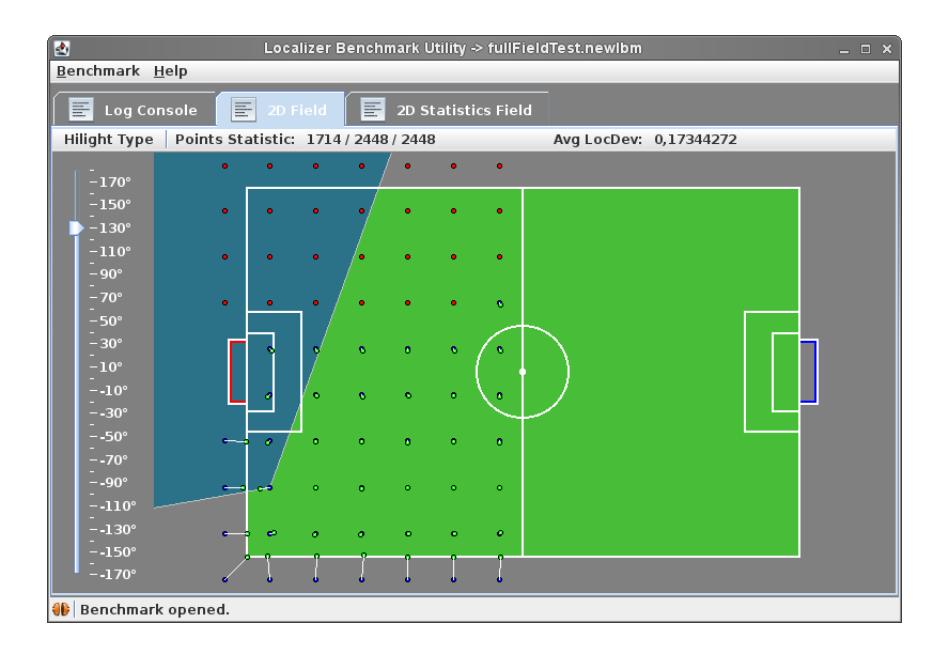
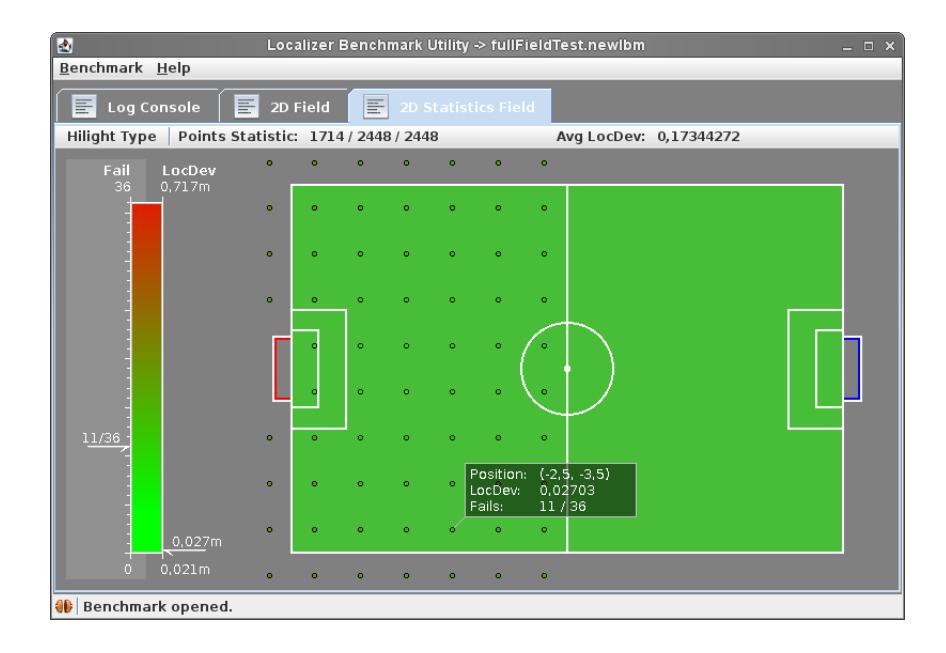
For evaluation we focus two basic statistics - the amount of successful localizations and the mean localization error to the respective positions. The Benchmark Tool provides two specialized perspectives, with different scope. While the "2D Field" view (see figure 2) shows results on measurement level, the "2D Statistics Field" view (see figure 3) provides summarized statistics for each point. With the "2D Field" panel it's possible to get a closer look on special areas of the soccerfield and their associated localization issues. Narrow angles, long distances or the amount of seen flags could be inspected. The amount of successful localized rotations to a point and the average localization error are visualized through the "2D Statistics Field" panel. It provides a field overview to offer a quick evaluation at a glace, but also detailed statistics to each measurement-point.
The Benchmark Tool itself is split-up into two parts. A generic agent runs different benchmark tasks, given by a benchmark driver. Further tool developments which focus on evaluating specific parts of the agent under specific behaviors could also make use of this generic benchmark agent, in order to run their own benchmark tasks. One of the future tasks is to integrate our genetic optimization framework into the benchmark tool to make use of its drivers and visualization.
4 EBN Development Kit
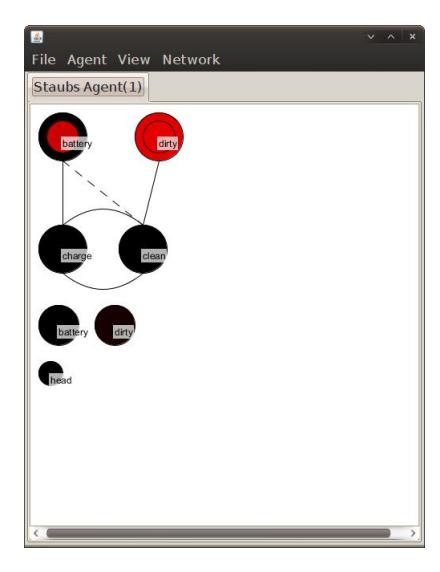
This tool allows to visualize, create and debug Extended Behavior Networks (EBNs) presented in [4]. At first it will show the static structure of an EBN, which consists of the set of goals, competence modules, perceptions and resources. These three elements are presented as circles. In addition the activation flow between the elements is shown. The application offers the posibility to create new networks, to modify existing ones and to save and load EBNs to/from XML. It also is possible to start an agent with a defined network. In this case also the runtime data (e. g. activation or executability values) is shown.
Because the application is covered to create EBNs for every type of agent, an interface must be implemented to adapt the EBN Development Kit to the problem. In order to use it for the RoboCup, this step has to be done for our soccer-agent. It also planned to integrate the application to the Agent GUI (see section 2).
Figure 4 shows a created network. The two circles at the top are goals, followed from two competences. At the bottom the resources and the perceptions where placed. The connecting lines are showing the activation flow between the elements.
5 Live-Movement
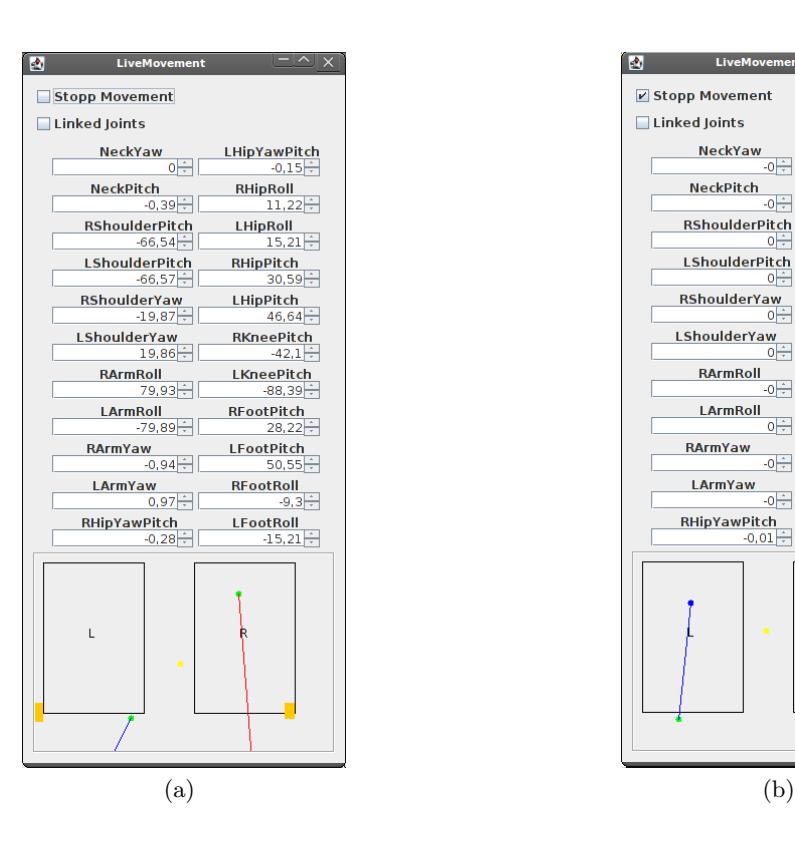
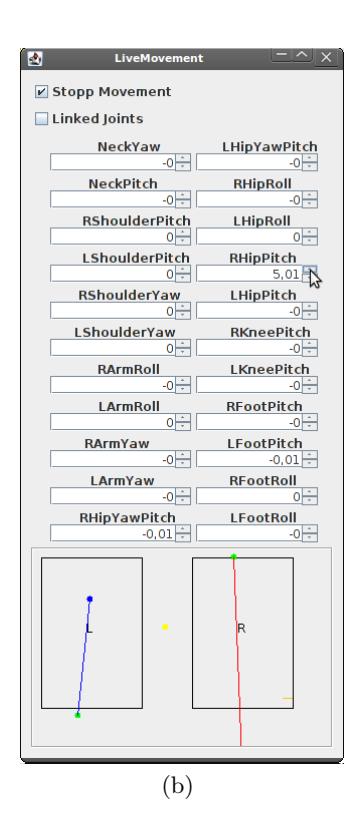
Initially, this tool was just created to see the foot pressure as received from the server. Because of the fast Movements of our behaviors it was nearly impossible to interprete the data. Therefore a few sliders where added to move some joints very slowly in order to see their impact on the feet's touch sensor. From time to time all joints where added to the GUI even more sensor outputs and also calculated values like center of mass or "average force on the feet" (see Fig. 5). It is much easier with this tool now to understand the values sent by the server. This tool allows also to run the agent like in a game with an original soccer decission making. It adds the possibility to interrupt current behaviors, watch the current state from every angle maybe change some joint positions and continue the current behavior.
In later revisions this tool will be integrated in the Agent GUI 2 and will have connections to the Motofile Editor 6 so that it is possible to see what you have created, save a state of a behavior or integrate it into an existing behavior.
6 Motorfile Editor
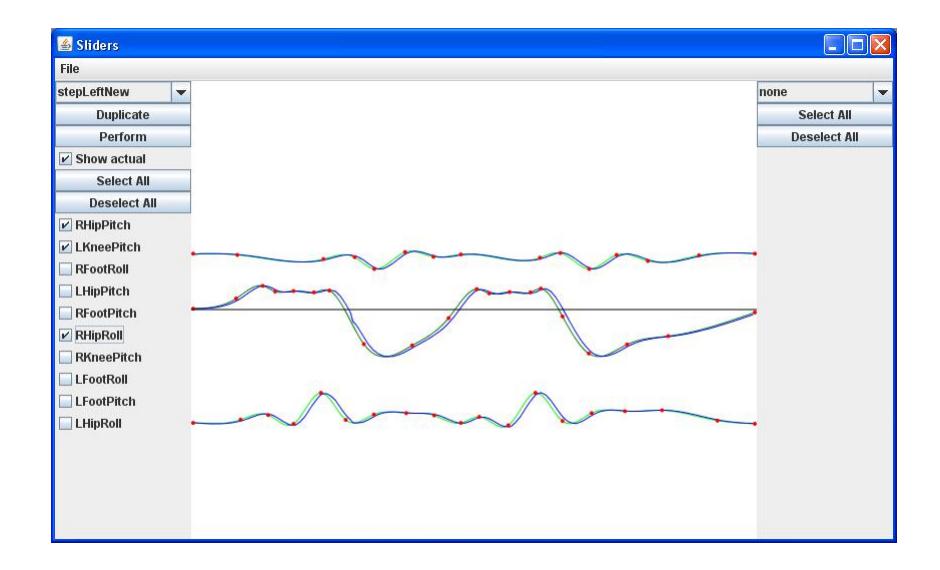
The motorfile editor (see figure 6) is used to create the behaviors of our agents. Behaviors are currently based on spline and sin functions for the joints. This editor allows to edit the support points of splines. We can choose any existing behavior, add new behaviors and save changed behaviors in files to be used by the agent. Behaviors can be duplicated to check changes before removing the old behavior. The tool is further able to connect to the RoboCup server and perform the selected behavior. While performing it, the editor records true angle values for the joints and shows them. This allows a simple comparison of intended and true angle values.
For the selected behavior we can select any of the involved joints to be displayed or not. Each of the functions can be selected to be editable by simple drag of points. The splines are updated immediately.
A second behavior can be selected to be drawn in background. It helps to show the difference of an original behavior and a slightly changed behavior.
7 Team
The magmaOffenburg team:
- Klaus Dorer (Team leader)
- Mathias Ehret
- Stefan Glaser
- Simon Raffeiner
- Thomas Rinklin
- Srinivasa Ragavan
- Ingo Schindler
- Rajit Shahi
References
- Dorer, K.: Modeling Human Decision Making using Extended Behavior Networks. J Baltes et al. (Eds.): RoboCup 2009, LNAI 5949, pp. 81–91. Springer, Heidelberg (2010)
- Dorer, K.: Extended Behavior Networks for Behavior Selection in Dynamic and Continuous Domains. In: U. Visser, et al. (Eds.) Proceedings of the ECAI workshop Agents in dynamic domains, Valencia, Spain (2004)
- Dorer, K.: Motivation, Handlungskontrolle und Zielmanagement in autonomen Agenten. PhD thesis, Albert-Ludwigs University (2000)
- Dorer, K.: Behavior Networks for Continuous Domains using Situation–Dependent Motivations. Proceedings of the Sixteenth International Conference of Artificial Intelligence (1999) 1233–1238