The magmaOffenburg 2011 RoboCup 3D Simulation Team
Klaus Dorer, Stefan Glaser, Simon Raffeiner, Rajit Shahi, Ingo Schindler
Hochschule Offenburg, Elektrotechnik-Informationstechnik, Germany
Abstract This paper describes the magmaOffenburg 3D simulation team trying to qualify for RoboCup 2011. While last year's TDP focused on the tool set created for 3D simulation in this year we describe the further improvement in this tools as well as some new features we implemented focusing on heterogeneous robot models which seem to be used in RoboCup 2012.
An additional tool was written to simply generate situation-dependent strategies. Furthermore some tools, described last year, are now integrated in one single GUI to easy things up.
1 Introduction
This year our team description paper describes the progress in agent framework and tool set development. The main focus is to provide a dynamic agent framework which is able to handle heterogeneous robot models. Besides the number of improvements to the framework, the rising number of new tools led to the creation of a more general development tool, which acts as a base platform for all tools. This leads to a higher tool integration, claims less effort in further tool development and increases the productivity in agent development.
2 Agent Framework
With the magma agent framework we try to provide a simple and powerful, Java based client for the RoboCup 3D simulation league. Since our first source code release in 2009 we got a lot of motivating response from other teams using our implementation base. Meanwhile, a lot of changes happened to the 3D simulation league, which we want to address with our next source code release after the competition in Istanbul. The main improvements are:
- support for heterogeneous robot models (agent meta model)
- support for server version handling (server meta model)
- runtime concept to separate and improve debugging options
2.1 Agent Meta Model
The introduction of heterogeneous robots raises the question of how to handle the different robot models. For example most behaviors written for the current NAO robot model are specially designed for its physical properties and cannot be directly deployed to another robot model. But besides these specific definitions, most components of the agent itself are still the same.
In order to achieve an agent framework which is able to handle heterogeneous robot models, we introduced an abstract meta model to represent the physical properties and equipment of the robot. With this meta model we are able to provide complete dynamic implementations of all components up to the control and decision making layers, including server connection, message parsing / creation, sensor representation, effector handling, physical model representation (e.g. center of mass, center of gravity, etc.), localization etc.
Since some components of the control and decision making layers are dependent on the robot model or on the amount of behaviors available, they cannot be easily designed to act dynamically with respect to heterogeneous robot models. Interface definitions and abstract base classes are provided to all components of these two layers which cannot be implemented dynamically in order to reduce the effort in development of behaviors and decision making of further robots.
2.2 Server Meta Model
Similar to the robot models, the server configuration also changes over time. For example the size of the field increased, or the amount of visible body parts changed over the last years. To face these issues, we introduced the server meta model which defines the server environment in conjunction with the agent meta model (described in 2.1). With this meta model we replaced the tight coupling of components to static environment definitions with a dynamic model. Changes in the environment can now be easily reflected and configured. Tools which visualize the environment perceived by the agent, are able to use the server meta model to setup reference points and dynamically perform calculations on them.
2.3 Agent runtime
One of the biggest tasks during agent development is debugging or the tracking of actions and decisions made during a soccer game. The rising number of tools led to more and more framework hacks, in order to provide the flexibility and manipulation options needed by these tools to do their job. Since the amount of tools keeps rising and with that the requested debugging options as well, this claims a clear and powerful debugging solution, which separates the debugging options from the normal application and doesn't allow abuse of components through their debugging options within the normal application flow.
For this reason the "agent runtime" was introduced to manage all components and the application flow during runtime of an agent. The default runtime doesn't allow any interaction - this runtime is used during show games and in competitions. Its task is simply the correct triggering of all components of the agent framework (manage application flow). For debugging purposes, the default runtime is replaced by a debugging runtime. This debugging runtime allows extensive interaction with all components as well as the possibility to exchange them on the fly. On this way, it's easily possible to replace the decision making with a specific controller to drive benchmarks, to exchange and test behaviors which are currently under construction and so on.
2.4 Team Strategy
One of the key challenges of a bunch of soccer players is to act as a team. In order to describe team behavior, we introduced xml-based strategy definitions and introduced a situation and role based passive positioning of our agents. A Strategy is a collection of game situations and the corresponding player roles, defining their passive behavior, i.e. where to position if not directly involved in the struggle for the ball. A tool was integrated into the developer (see next section) to create and simulate these strategies before using them.
3 Developer Tool
Since our team started to create a client for the RoboCup 3D simulation league, along with the agent development, a lot of tools were created to analyze, monitor or create specific components of the agent. Unfortunately, most tools were created during individual thesis work of different persons. Therefore, the integration of these tools into each other and the agent framework was missing and a lot of effort was spent on providing individual interaction modules to the agent framework. Due to the massive refactoring of the agent framework components described in section 2, the integration into the agent framework is now done by a debugging runtime. To address the tool integration issue, we decided to create a more general tool, which acts as a base platform for all other tools - the so called developer tool.
The main purpose of the developer tool is to provide tedious functionality of a GUI application and an easy to use API to plug in new tools and / or functionality. Therefore the developer tool itself is quite lightweight. It only provides a plugin registry and deals with action management, view management and persistence. The developer application after startup contains just a menu bar at the top, a dynamic tool bar on the left and several containers in the center. Real tools are designed as plugins and loaded at startup. They can contribute model functionality, menu bar actions and / or different kind of views, which are then embedded into the developer tool.
One purpose of the development tool also is the possibility to provide different dynamic controls, which can be reused by several tools. For example the development tool contains a dynamic explorer view to manage arbitrary entities of all tools. Each tool can define its own entities and provide specific actions to them, which are then visualized by the explorer. The explorer also provides dynamic linking of available views to an entity to simplify the integration of new views. The availability of the meta models described in section 2 offers even more options for dynamic controls. For example the visualization of a 2D soccer field topview and its corresponding field-to-panel transformations are just dependent on the server meta model and the actual panel size. On this way a dynamic 2D soccer field control was created with the option to register a special renderer and editor, to allow application specific printing and handling of user input.
Besides a group of dynamic controls there are currently two main plugins available: the debugger plugin and the strategy developer plugin. While the debugger plugin provides models for agents and servers and offers several monitoring options to them, the strategy developer plugin is used to design xml-based strategy files, which are used by our agents to gain better team play.
3.1 Debugger plugin
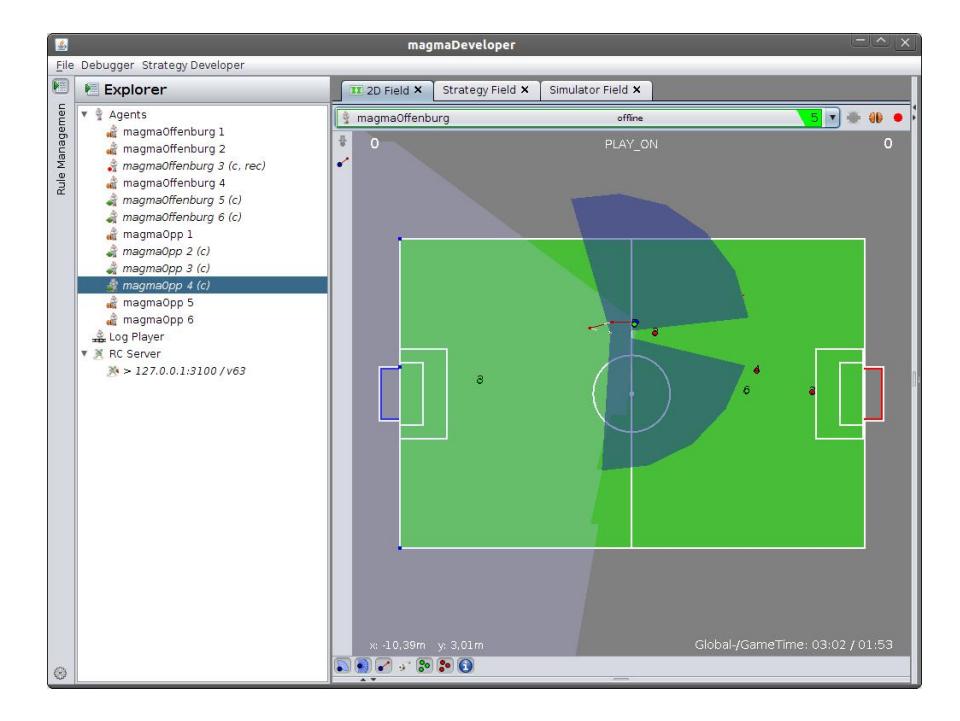
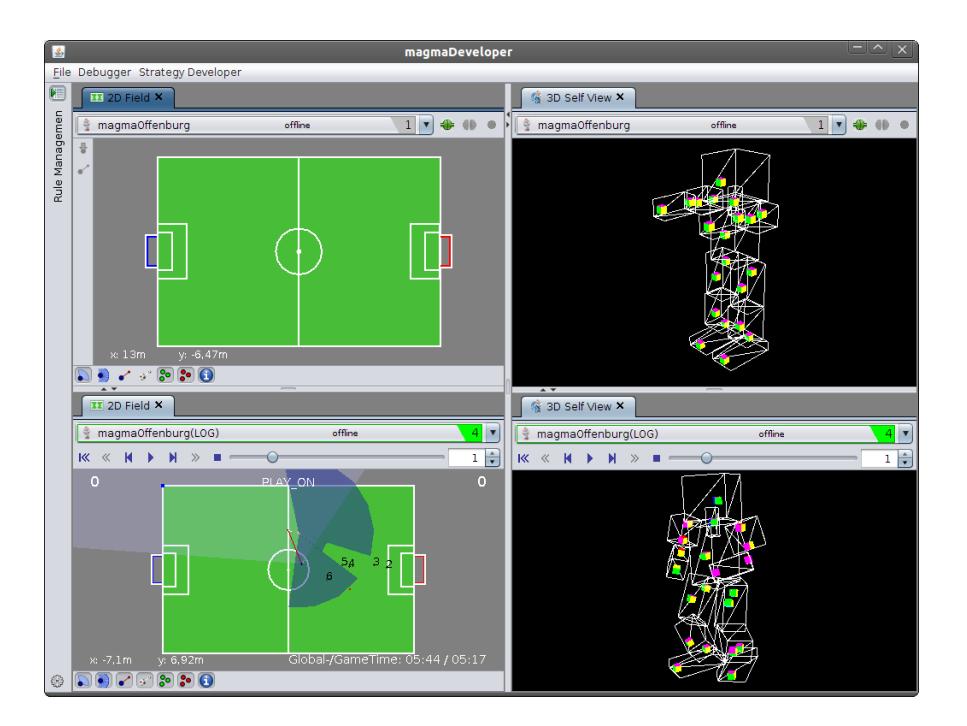
The debugger plugin was built to extend the developer tool with debugging functionality with respect to the agent. In order to do so, it provides application models to agents and servers, as well as a 2D Field view and a 3D self view to an agent. The management of agents and servers is done by extending the dynamic explorer control (left in figure 1) of the developer tool. The two debugging views are represented as tabs in the center of the developer tool. As shown in figure 2 multiple of each of those views may be attached to arbitrary agents at the same time . Besides the possibility to monitor and interact with a running agent, the debugger plugin also offers to record and replay log-files. This log-files are recorded as a stream of snapshots of the complete agent, in order to allow in depth, step by step analysis of the decisions taken by the agent.
The 2D Field view (shown in figure 1) visualizes the environment, perceived by an agent in a topview. It uses a composite renderer and editor for the dynamic 2D soccer field control to allow more complex paintings and interactions. Renderers are used to visualize specific information perceived and / or calculated by the agent and can be enabled or disabled through the tool bar at the bottom. Currently there are several renderer available, e.g. for painting the ball, the own and opponent players, the desired position, etc. Further renderers can easily be plugged in to visualize additional information. Besides the different renderers, editors are used to process user interaction. The tool bar on the left allows the user to switch between different tools to interact with the agent through the soccer field. Currently there are just the options to set a beam position and the desired position of an agent, but likewise the renderers, further editors can be plugged in easily. The agent instance represented in the 2D Field view can be selected in the menu on the top. If the selected agent represents a loaded log-file, the tool bar containing the editors disappears and a menu with media player controls appears on the top to control the log-file player (see figure 2 for an example).
In addition to the 2D Field view, the 3D self view was build to provide an impression on the internal body part arrangement. In this view the agent meta model of section 2.1 is used to setup a dynamic box-model representation of an agent. Similar to the 2D Field view, it is possible to choose the agent instance to represent and control log-file players, although the possibility to plug in special renderers and editors isn't present yet. Figure 2 shows two open 3D self views, one showing playing a log-file, the other a disconnected agent. This view is also planed to be reused in a behavior editor, to support the developer during the creation of new behaviors with a live representation of the current behavior under construction.
3.2 Strategy Developer plugin
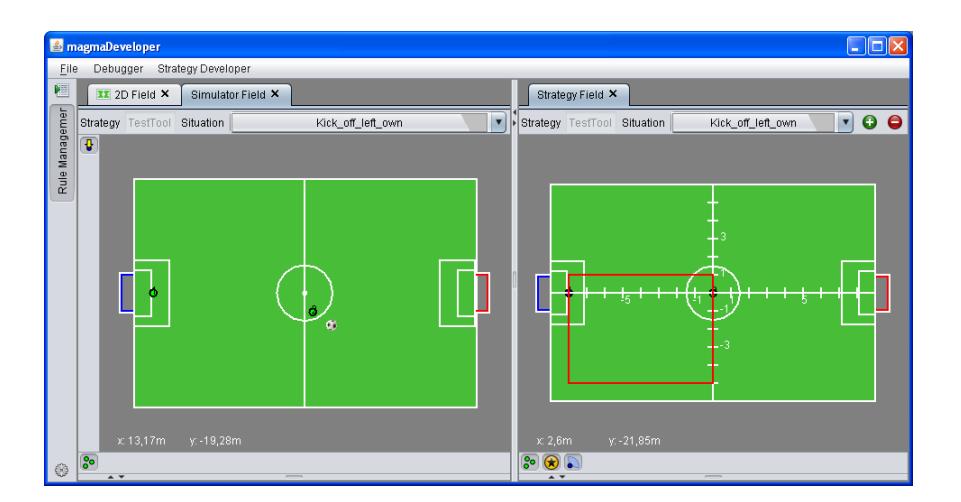
The strategy developer is used to create passive positioning strategies for various situations. The integrated simulator allows to test these strategies by moving arbitrary moveable object on the field and follow how other players react to those movements. This way enormous amounts of time can be saved compared to testing passive positioning using the real simulation especially for rare situations like corner kicks.
Figure 3 shows an example of a strategy definition for two players on the right and the simulator in which ball and players can be moved on the left. While moving e.g. the ball, one can observe players positioning relative to the ball move.
4 Team
The magmaOffenburg team:
- Klaus Dorer (Team leader)
- Stefan Glaser
- Simon Raffeiner
- Ingo Schindler
- Rajit Shahi
References
- Dorer, K.: Modeling Human Decision Making using Extended Behavior Networks. To appear in: RoboCup Symposium, Graz, Austria (2009)
- Dorer, K.: Extended Behavior Networks for Behavior Selection in Dynamic and Continuous Domains. In: U. Visser, et al. (Eds.) Proceedings of the ECAI workshop Agents in dynamic domains, Valencia, Spain (2004)
- Dorer, K.: Motivation, Handlungskontrolle und Zielmanagement in autonomen Agenten. PhD thesis, Albert-Ludwigs University (2000)
- Dorer, K.: Behavior Networks for Continuous Domains using Situation–Dependent Motivations. Proceedings of the Sixteenth International Conference of Artificial Intelligence (1999) 1233–1238
- Maes, P.: The Dynamics of Action Selection. Proceedings of the International Joint Conference on Artificial Intelligence (1989) 991–997
- Veenstra, A., Neijt, B., Vermeulen, F., Veenstra, G., Prins, J., Kuypers, J., Stollenga, M., vd Sanden, M., Klomp, M., Platje, M., van Dijk, S. The Little Green Bats at http://www.littlegreenbats.nl/ (2008)