RoboDragons 2011 Extended Team Description
Akeru Ishikawa, Kotaro Yasui, Taro Inagaki, Hajime Sawaguchi, Tomomi Yasui, Kazuhito Murakami, Tadashi Naruse
Aichi Prefectural University, Nagakute-cho, Aichi, 480-1198 JAPAN
Abstract This paper describes the software system of RoboDragons, since we described the robot hardware of RoboDragons, which was newly developed last year, in the team description paper[1] in detail. The software consists of three main modules, i.e. Rserver which interfaces the SSL-Vision and other modules, Soccer which computes the action of each robot and View which is a GUI. This paper describes the Rsever and Soccer modules, especially paying attention on an interface between SSL-Vision and Rsever.
Introduction
For our software, the base of our system is originated from the one at the time when we have been a joint team with CMU in 2004 and 2005. Since 2006, many functions are added and improvements are accomplished. Then, last year, some troubles are found from our interface program by introducing ssl-vision as a vision system.
In this paper, more descriptions on our software are provided. The main change from the last year's system is an interface program between SSL-Vision and the interface module (Rsever) of our system. Therefore, the completed interface program is described by the structure and algorithm.
Hardware Architecture
The hardware architecture of our robot was already described in [1]. Therefore, a simple explanation of our robot is shown below.
Table 1. Hardware Components and Their Roles
| Parts of Robot | Role |
|---|---|
| Control Unit | Control other parts in a robot |
| Voltage Booster | Increase the voltage in order to use kick device |
| Motor | DC brush-less motor and use to drive the omni-wheel |
| Omni-wheel | A large wheel with 15 small tires in circumference |
| Dribble Device | Give a backspin and keep to trap a ball |
| IR sensor | Use to detect a ball with three infra-red lights |
| Kick Bar | Kick a ball straight forward |
| Chip Kick Bar | Kick a ball upward |
| Communication Device | Communicate robots with our system |
Software
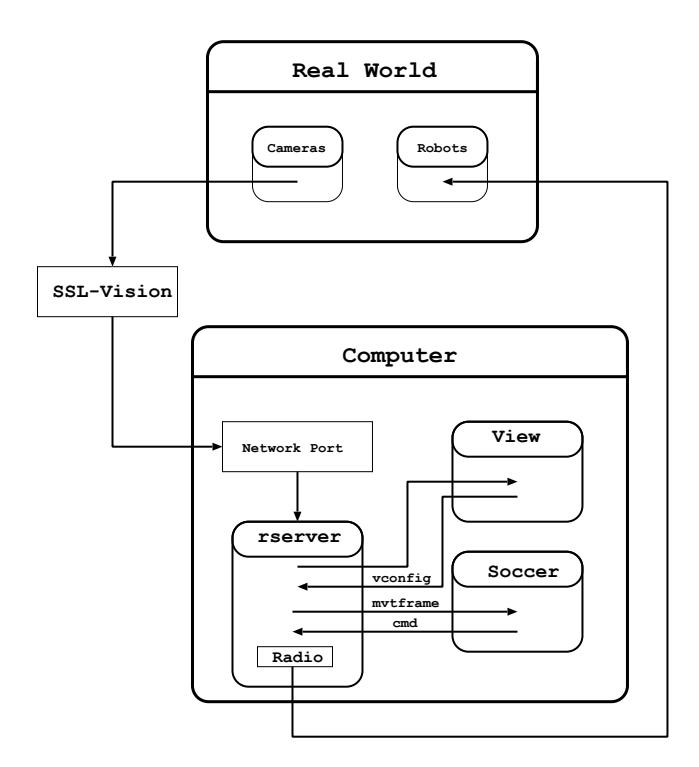
In this section, we describe the software of our system. Figure 1 shows the overview of our system. Three main modules, which are Rserver, View, and Soccer, run on the computer which consists of Athlon64 X2 4200+, 512MB memory and Debian GNU/Linux OS. The relations among them are shown in Fig. 1. The role of each module is summarized below.
- (1) The Rserver module is an interface between SSL-Vision and other modules. The main role is to receive SSL-Vision data. Then a radio sub-module sends a command to each robot through the radio system.
- (2) The View module is used to see the simulated image of real world through Rserver. It helps users to easily understand the situation.
- (3) The Soccer module makes an action command for each robot. This module consists of a strategy, a tactic, and a path generation submodules.
Rserver Module
Rserver Module is an interface between SSL-Vision and our system and used to get world information property. World information include a position of the ball, a position for each robot corresponding to ID, and a direction for each robot. In this section, we describe Rserver's structure and its algorithms by using a chart. (This is the detailed description of the software shown in [1].)
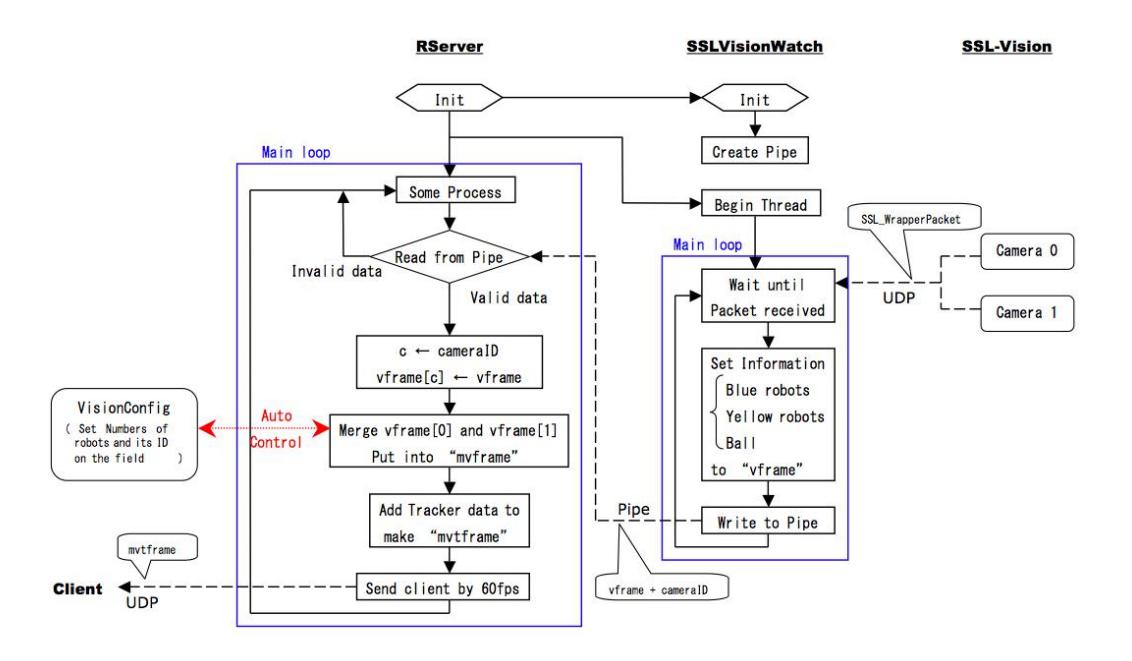
Tips of Figure(2)
| Tips of Figure(2) | |
|---|---|
| RServer | Interface program between SSL-Vision and system |
| SSLVisionWatch | A class of getting SSL-Vision's data to produce vframe |
| vframe | Storage of SSL-Vision data for each camera |
| mvframe | Storage of merged data from every camera's vframe |
| mvtframe | Storage of tracker and mvframe data |
| VisionConfig | Robot Configuration (set the numbers of robots and these IDs) |
Explanation of Rserver Process in Figure(2)
- Begin from Rserver's main function
- Call Rserver's init function
- (a) Open ports(client, referee) by UDP
- (b) Call SSLVisionWatch's init function
- i. Open ports(SSL-Vision) by UDP
- ii. Create a pipe
- (c) Reset some variables used in RServer
- Call SSLVisionWatch's function
- (a) Make thread and Begin thread
- (b) Get SSL-Vision's data, which is SSL WrapperPacket class
- (c) Choose a reliable ball, which has most confidence
- (d) Choose reliable blue robots, which have different IDs
- (e) Choose reliable yellow robots, which have different IDs
- (f) Put these information into vframe
- (g) Write to a pipe for a vframe
- Some other process, which is not related to SSL-Vision
- (a) Check whether referee command received
- (b) Set the number of robot, ID's, and team color if VisionConfig was set
- Read vframe data from a pipe
- Check for which camera's information is used for vframe
- Merge every camera's vframe data and the results are set into mvframe
- Add tracker data and the results are set into mvtframe
- Process a kick detection of opponent robot by getting a ball's position
- Send mvtframe to client by 60fps
- Make a robot command's packet by receiving from client and Send it to radio
Main Flow of the Rserver
Get SSL-Vision's data(SSL WrapperPacket) ↓ Extract reliable data(ball and robots) Put data into vframe for each camera ↓ Merge vframe for each camera Put merged data into mvframe ↓ Add tracker data with mvframe Put result data into mvtframe ↓ Send mvtframe to client ↓ Get command data from client ↓ Make command packet and send it to radio
Table 2. The main flow of the Rsever
| Step | Description |
|---|---|
| 1 | Get SSL-Vision's data (SSL WrapperPacket) |
| 2 | Extract reliable data (ball and robots) |
| 3 | Put data into vframe for each camera |
| 4 | Merge vframe for each camera |
| 5 | Put merged data into mvframe |
| 6 | Add tracker data with mvframe |
| 7 | Put result data into mvtframe |
| 8 | Send mvtframe to client |
| 9 | Get command data from client |
| 10 | Make command packet and send it to radio |
Algorithm of Choosing a ball for each camera
- Get ball's data from SSL WrapperPacket
- Find the most config ball data
- Add it to vframe for corresponding camera
Algorithm of Choosing robots for each camera
- Get robots' data from SSL WrapperPacket
- Add each robots' data to vframe if there is no duplicate robot ID
- Search other robot ID, which is the nearest distance to last frame
- Add it to vframe for corresponding camera
Algorithm of merging a ball
- Let vframe[0] and [1] be a ball data from camera No.0 and No.1 respectively
- Compare vframe[0] with [1] and find a ball data with high confidence
- Add the ball data chosen at 2. to a mvframe
Algorithm of merging robots
- Let crobot[0] and [1] be robots' data from camera No.0 and No.1 respectively
- Compare crobot[0] with [1] for each robot ID
- Choose a robot with high confidence for each robot
- Look at the VisionConfig's robot ID for which robot to be available
- Add robot data, corresponding to it and having confidence, to mvframe
Soccer Module
A soccer module is used to make an action command for each robot. In order to make a role, many patterns of strategies are needed to be compared from a field condition. Then a soccer module decides a best strategy matched in the game at the time. This is a movement of the soccer module to choose a best strategy.
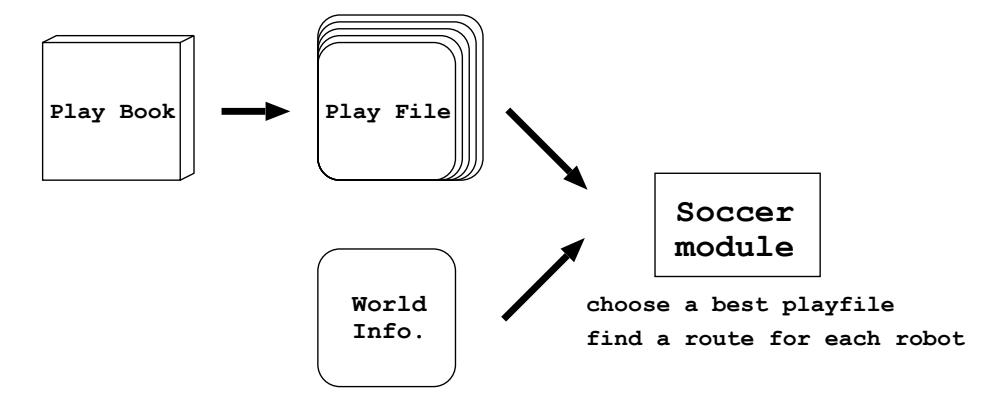
- A play book is a group of play files. All play files used in the game are congregated in this play book. By this information, all patterns of strategies can be set and calculated by a soccer module.
- A play file, which is a strategy, indicates a role for each robot except a goal keeper. Each play file has to be written a requirement for choosing compared to a condition on the field.
- A world info. is given by a ssl-vision and contains a condition on the field.
- A soccer module compares a requirement for each play file with a field's condition by a world info. A strategy played in the game is chosen by this result, which is a best match to the field's condition.
After a role of each robot is chosen, the soccer module also decides a route for each robot. This result is reflected to the command and sent to a robot through the modem.
Conclusion
In this paper, we showed the software system of RoboDragons mainly in regard to interface module (Rsever) and soccer module. Last year, we suffered from a malfunction of the Rserver module. The interface program between the SSL-Vision and the Rserver had bugs. We fixed them and revised the system. Therfore, we described this paper paying attention to the point.
acknowledgement
This work was supported by the cheif director's special study fund of Aichi Prefectural University and the president's special study fund of Aichi Prefectural University.
References
- Taro Inagaki, Hajime Sawaguchi, Akeru Ishikawa, Kotaro Yasui, Tomomi Yasui, Yuji Nunome, Kazuhito Murakami and Tadashi Naruse "RoboDragons 2011 Team Description", 2011