URoboRus 2022 Team Description Paper
Petr Konovalov, Mikhail Lipkovich, Tseren Frantsuzov, Alexandr Meshcheryakov, Yury Glazov, Boris Viktorov, Andrey Sviridov, Alexander Fradkov, Voloshina Anastasiia
Saint Petersburg State University, Saint Petersburg, Russian Federation
https://github.com/petr-konovalov/LARCmaCS · https://github.com/mlipkovich/strategy-bridge · https://github.com/petr-konovalov/MLscripts · https://www.mathworks.com/products/MATLAB.html · https://www.qt.io · https://zeromq.org/ · https://github.com/zeromq/zmqpp · https://pyzmq.readthedocs.io/en/latest/ · https://docs.python.org/3.9/library/asyncio.html · https://ch.mathworks.com/help/MATLAB/MATLAB_external/install-the-matlab-engine-for-python.html · https://github.com/RoboCup-SSL/ssl-vision · https://en.wikipedia.org/wiki/Kalman_filter · https://en.wikipedia.org/wiki/Median_filter · https://github.com/TIGERs-Mannheim · https://github.com/ZJUNlict · https://github.com/RoboDragons
Abstract In our TDP 2022 a brief description of new software for communication and control design is given. The software includes a new version of LARCmaCS - the program uniting SSL Vision and Referee packages and decoupling the low level code dedicated to dealing with UDP connections and packages parsing for the control design. A new version of LARCmaCS includes a new component - 'strategy-bridge' supporting calculation of control signals for robots. An additional facility is developed allowing MATLAB programs (files) to have more than one function in one file which is not possible in a standard version of MATLAB environment. New filtering algorithms are proposed and evaluated. Two new speed control algorithms are described and compared.
1 Introduction
The core of our team consists of students of the Department of Theoretical Cybernetics of St. Petersburg State University and students of the Presidential Physics and Mathematics Lyceum No. 239. We work together with engineers who have developed robots and maintain them in working order. We started creating our solution in September 2018. By the end of January 2019, the team had qualified for Robocup 2019. In 2020, we also qualified, and in June 2021, we took part in the RoboCup SSL virtual competitions. Also in October 2021 we took part in the RoboCup Brazil Open.
Our goal is also the development of new solutions for educational robotics available to secondary schools, high schools and universities. Some of the ideas described in this TDP can be used to achieve this goal.
2 Control Software
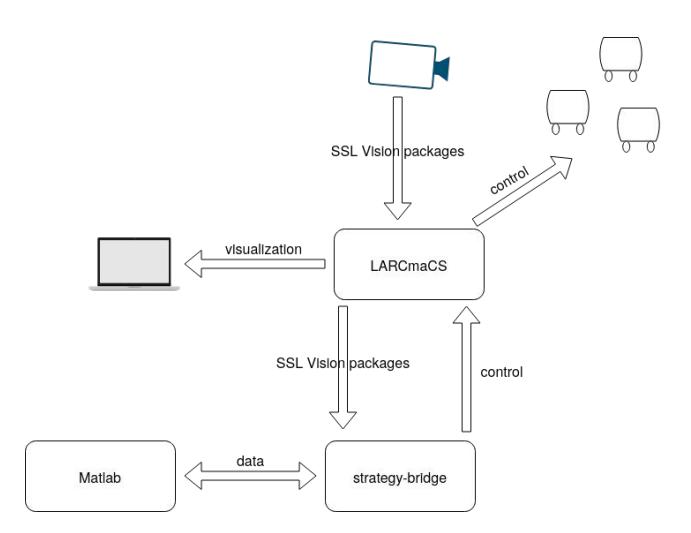
In this section the brief description of the software responsible for control design will be given. The software consists of the following three components:
– LARCmaCS
Gathers SSL Vision and Referee packages and forwards it to strategy-bridge
Provides a basic visualization of the field
Passes control commands from strategy-bridge to the robots
strategy-bridge
- Holds the game state
- Runs asynchronous worker tasks to calculate control signals for robots
- Passes heavy calculations to MATLAB scripts
MATLAB scripts
- Set of stateless MATLAB scripts which perform heavy calculations
The goal of this split is to decouple the low level code dedicated to dealing with UDP connections and packages parsing from the control design. More details about each of the components is given below:
2.1 LARCmaCS
This component is developed in C++ using the Qt framework. C++ language is well suited for handling low-level UDP interactions with SSL Server and robots.
Detailed description of LARCmaCS was given in the last year's TDP. The previous version of LARCmaCS was communicating with MATLAB scripts directly through setting MATLAB variables. Each new SSL package is triggering these variables update. Due to that MATLAB scripts developers were not able to control the main execution loop of their scripts and had to use global variables to hold the game state. This approach was error-prone, was not flexible enough and often required changes in C++ code when MATLAB scripts logic was updated.
This year the communication between LARCmaCS and MATLAB scripts was decoupled by introducing a new component strategy-bridge which gets data from LARCmaCS and uses MATLAB as a library for heavy computations. LARCmaCS publishes SSL packages to ZeroMQ topic using libzmqp library. The strategy-bridge consumes these packages and calculates robots' control signals which are published to another ZeroMQ topic. LARCmaCS forwards control signals from this topic to robots. Therefore LARCmaCS component becomes static and does not need any changes unless communication protocols between SSL Server or robots change.
2.2 strategy-bridge
This component is developed by using Python language for its relative ease of use and for its rich set of libraries. The goal of the component is to calculate control signals for robots. The main abstraction of strategy-bridge is a Processor — the single unit which runs in an infinite loop. All the data that should be shared between different processors through the in-memory structure called Data Bus. Processors may need to use MATLAB scripts for heavy computations. Interaction with these scripts is implemented through MATLAB Engine module. Resulting control signals are published into ZeroMQ topic using pyzmq library for latter consumption by LARCmaCS.
Processor This is the main abstraction for a task which runs asynchronously in an infinite loop using asyncio. Everything that is running in strategy-bridge should be implemented through this interface. There is a processor which consumes SSL data and processor which publishes resulting control signals. Other processors are dedicated to data preprocessing and control signals calculation. User configures the rate at which particular task is running. Each task may consume data that was produced by other tasks and share its own results. Task may optionally run MATLAB scripts by means of MATLAB Engine.
Data Bus This is an in-memory structure that holds the shared state. Data is split into topics where each topic is a bounded queue. One can configure the size of each particular topic. After topic reaches its size limits older values are evicted. Each processor is able to write into one or several topics. Processors are allowed to read records from topics that do not belong to them.
MATLAB Engine The task of this module is to run MATLAB scripts. Interaction with MATLAB is implemented through MATLAB Engine API for Python. MATLAB Engine runs MATLAB in asynchronous fashion therefore it does not block the task which triggered the script execution.
2.3 MATLAB scripts library
MATLAB scripts are run through Processors from strategy-bridge. Currently MATLAB contains most of the strategy business-logic besides computations. Future work will be dedicated to migrating this logic to strategy-bridge so that MATLAB will be used as a computational tool only.
Control signals are calculated using algorithms presented in section Algorithmic part.
3 MATLAB issues
Unfortunately, MATLAB, being "a programming and numeric computing platform used by millions of engineers and scientists to analyze data, develop algorithms, and create models", was not specifically designed for our needs. This makes some of the things we need it to do difficult.
3.1 Namespaces
MATLAB has a single global "workspace" by default, in which it loads all the visible symbols. Making modules to separate names, although possible, requires clearing the workspace on every change, which slows down development considerably. The environment processes classes separately and requires rebuilding to apply changes, which is also slow.
Additionally, it's impossible to load more than one function from a single file directly; so, when there is a need to make a lot of them e. g. for a geometry library, large heaps of small files appear. It is also impossible to separate declarations from definitions, at least directly.
We had to make use of a workaround in the form of function references. A source file contains a function to pack its contents into a reference array:
geometry src.m
function ref_array=geometry_src()
   ref_array={...
       @get_angle, ...
       @rotate_2d,...
       @select_closest_point,...
       @to_cartesian...
       %more symbols to output...
   };
end
%definitions...
Then a header file unloads its contents back:
geometry header.m
ref_array=geometry_src();
get_angle=ref_array{1};
rotate_2d=ref_array{2};
select_closest_point=ref_array{3};
to_cartesian=ref_array{4};
%more symbols to unpack...
3.2 Performance
Mainly running on an interpreter, MATLAB definitely has a heavy overhead compared to native, compiled languages such as C++. Although not a concern as for now, this may be a problem when the code base grows larger.
4 MATLAB advantages
The first and obvious advantage is the mathematic expressivity: built-in support for vector algebra, operations on matrices and geometry support speed up development significantly, saving us from the need to make them ourselves.
Another advantage is MATLAB's light type system: not needing to worry about type conversions and good builtin array support are a great help when designing code.
One more thing is the ability to plot values of interest quickly and effortlessly. This allows us to debug code faster.
4.1 Summary
MATLAB is not the perfect tool for our needs; although powerful, it makes for a poor experience when organizing large projects. We had to make use of a workaround to export multiple function identifiers from a single file.
5 Algorithmic part
(continued in subsections)
5.1 Filtering of object position
The SSL Vision recognition system is used at RoboCup competitions to recognize the coordinates of robots and the ball on the field. Often it sends these coordinates with some uncertainty. Therefore, many teams eventually came up with the idea of filtering the data received from SSL Vision, and our team is not an exception. The most popular filtering method among RoboCup SSL teams is the Kalman filter. Its modifications judging by the TDP of experienced teams have been successfully used in competitions for many years.
However the Kalman filter has a few drawbacks:
- It is labour intensive in terms of implementation
- In some cases, which we will consider further, its actions are redundant
Let's take a closer look at the first item. Firstly, our team uses MATLAB for description of robot control algorithms while many other teams, especially more experienced ones, prefer other languages, as seen in their GitHub. Secondly, it is worth noting that MATLAB has an implementation of the Kalman Filter encapsulating only the logic of calculations of known formulas. The main difficulty arising from this lies in design of a mathematical model of the system. Thirdly, it is well known (and many teams note) that the Kalman Filter does not work properly with strongly nonlinear system behavior, when an object abruptly changes its direction of motion. A typical case is predictiong the motion of the ball bouncing off another robot.
Let's take a closer look at the second statement. If the filter is used for estimation of the positions of stationary objects then there is no need to calculate the velocity. Consequently, the Kalman Filter does an excessive action at the prediction stage, since it calculates the speed.
Before proceeding to the description of our method, two comments are due:
- Sometimes SSL Vision determines false objects and leads to data outliers. For example, it can estimate the ball position at the top of some robot.
- There is always a random error in the measurement.
Our approach to filtering can be divided into two stages. At the first stage, the median filter is used to discard outliers in the data in order to solve problem 1. Then, at stage 2, our filter reduces the variance of the random error. This is achieved by weighted averaging of the data obtained at the current step from the median filter and the filtering results obtained at the previous step.
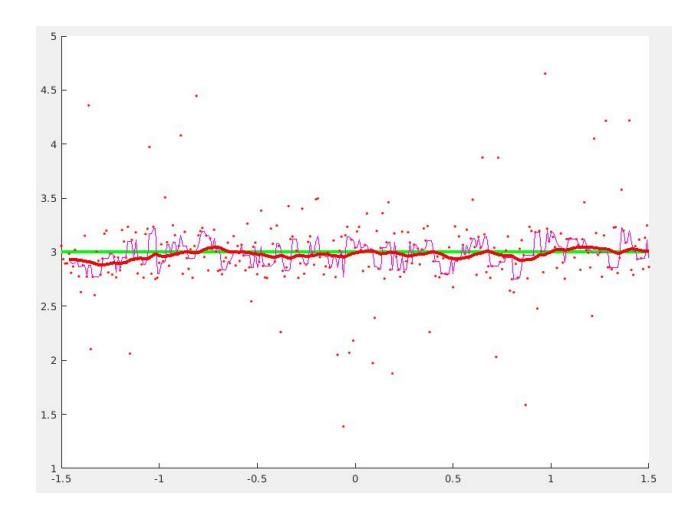
The Fig. 2 shows an example of how the filter works. The green line shows the measured value, the red dots correspond to the measurement results, the purple line is the result of the median filter, and the red solid line is the final result of the filter. The following conclusions can be made from the picture:
- Median filter removes outliers as expected.
- The variance of the error decreases when averaging is applied.
Note that the probability of the outliers appearance is rather high (about 0.2). The median filter window size is 5, weights for weighted arithmetic mean are 0.05 and 0.95 for current step median filter measurement and previous step filter result respectively.
The presented approach to filtering was successfully applied by our team at RoboCup 2021 (it was not described in our previous TDP since its final version was tested after TDP submission). It has demonstrated reasonably good performance.
5.2 Two approaches to speed control
We have created two algorithms for speed control. Each of them has its advantages and disadvantages. The reason why we need two different algorithms is in that we worked with two generations of robots. The old (1st generation) robots were not made high precision and drove at different speeds. This is expressed in different times of overcoming the same distance with the same values of speed parameters. For such robots, it was necessary to create special software functions that would synchronize the work of all robots and their characteristics. There is no such problem for the second generation. New robots move at the same real speed, and such software settings are no longer needed. Thus, we have two algorithms, because one of them is necessary for the first generation of robots, and for the new one it is simply redundant.
Algorithm 1. Robot moves from point A to point B along a straight line. Denote by x(t) the distance of the robot from the point A at time t. The following restrictions are imposed:
$$|\ddot{x}(t)| < w$$ – acceleration limitation $$|\dot{x}(t)| < v$$ – speed limitation (1)
We assume that the constants w and v are known to the controller designer. Then it will be optimal for robot to accelerate as long as possible, afterwards go with full speed and in the end slowing down as fast as possible. In this way absolute speed graph looks like trapezoid. Denote by x * (t) the function describing such movement. Apparently, it is a function, for which we may choose parameter values T^w < T^v < T necessary to describe the following relations:
$$\ddot{x}^(t) = w$$ for $$t \in [0, T_w]$$ – constant acceleration segment $$\dot{x}(t) = v$$ for $$t \in [T_w, T_v]$$ – constant speed segment $$\ddot{x}^(t) = -w$$ for $$t \in [T_v, T]$$ – constant deceleration segment $$\dot{x}^*(t) = 0$$ for $$t > T$$
Denote the control function by u(t). Then the model is described by the following equation
$$\dot{x}(t) = C \cdot u,\tag{2}$$
where C is an unknown constant that may be different for different robots in the team. Integrating (2) we obtain the following equation:
$$C = \frac{x(t) - x(0)}{\int_0^t u(\tau) d\tau}.$$
This equation provides a good estimate of C even if there is an error in the measurement of x(t), since the denominator increases with time. Thus, it is possible to restore the constant C, and the greater the distance the robot will travel, the more accurate the estimate will be.
Then one can calculate the control as follows:
$$u(t) = \frac{\dot{x}^(t) + K \cdot (x^(t) - x(t))}{C},$$ (3)
where K is a parameter that is selected manually and function x * (t) specifies the desired robot movement. Note that the difference x * (t)−x(t) shows how far the robot is behind the schedule.
Algorithm 2. Let the robot move from point A to point B. Then from the basic kinematic one can derive the following relation:
$$V = \sqrt{2aS}. (4)$$
where a is the robot constant acceleration, which is set manually, S is the distance to the goal point at a given time. Next, using the velocity V * obtained during the last step, we change the acceleration to arrive at the velocity V. Like in the first algorithm, the same restrictions (1) are imposed.
Choosing the best algorithm. The algorithms were tested both on the simulator and on physical robots of both generations. Old robots move at different speeds when applying the same control value u under the same location conditions. The new type of robots ensure that different robots will move the same way when applying the same control value u under the same location conditions. The use of the first algorithm is more preferable for robots of the old generation, because they all strive for the "ideal" speed. While using the second algorithm, the features of their movement are preserved. When applied to new robots, there was no particular difference between the two algorithms, as well as when testing on a simulator.
At the first glance, we may conclude that the first algorithm is better and it is worth using. However this is not the case due to the following reasons:
- The second algorithm is just much simpler.
- In the first algorithm it is necessary to store data about the system behavior for quite a long time and take into account many conditions in order to reset the data at the right time. In the second algorithm it is necessary to store data only from the last step.
- In the first algorithm everything is based on the use of a proportional regulator, which always has a nonvanishing error.
Thus, the second algorithm is simpler, and it does not break, which is why we chose it.
6 Mechanics and electronics
Our mechanic and electronic design can be found in our previous TDP.
7 Conclusions
This TDP provides a brief description of new software for RoboCup SSL robots. First, a new version of LARCmaCS - the software uniting SSL Vision and Referee packages is described. It includes a new component - strategy-bridge supporting calculation of control signals for robots. An additional facility provided in our new software enables MATLAB programs (files) to contain more than one function in one file which is not possible in a standard version of MATLAB environment. The basic version of the library of functions includes the library of geometric operations. New filtering algorithms are proposed and evaluated. Finally, two new speed control algorithms are described and compared.
In the future it is planned to expand the library with such functions as avoiding obstacles, choosing a point for attacking the goal, an algorithm for distributing targets between robots, a goalkeeper algorithm, etc.
References
- SSL Vision system, official repository, https://github.com/RoboCup-SSL/ssl-vision
- Petr Konovalov, Dmitry Korolev, Dmitry Kapustin, Galina Reneva, Anastasiia Voloshina, Alexander Kalitin, and Alexander Fradkov, URoboRus 2020 Team Description Paper, https://ssl.robocup.org/wp-content/uploads/2020/03/2020_TDP_RoboRus.pdf
- Prof. Dr. Rahib H. ABIYEV, Dr. Pavel MAKAROV, Ahmet CAGMAN, Ersin AYTAC, Gokhan BURGE, Ali TURK, Nurullah AKKAYA, Tolga YIRTICI, Gorkem SAY, Berk YILMAZ, NEUIslanders Team Description Paper RoboCup 2019, https://ssl.robocup.org/wp-content/uploads/2019/03/2019_TDP_NEUIslanders.pdf
- J. Almagro, C. Avidano, C. Lindbeck, J. Neiger, Z. Olkin, E. Peterson, K. Stachowicz, W. Stuckey, M. White, M. Woodward, G. P. Burdell, RoboJackets 2019 Team Description Paper, https://ssl.robocup.org/wp-content/uploads/2019/03/2019_TDP_RoboJackets.pdf
- Tomás Rodenas, Ricardo Alfaro, Pablo Reyes, Felipe Pinto, Maximiliano Aubel, Nicolás Hernández, Pablo Yanez, Tania Barrera, Daniel Torres, Jorge Alvarez, Damián Quiroz, Rubén González, Sysmic Robotics 2019 Team Description Paper, https://ssl.robocup.org/wp-content/uploads/2019/03/2019_TDP_Sysmic_Robotics.pdf
- Kalman Filter description: https://en.wikipedia.org/wiki/Kalman_filter
- Andre Ryll, Nicolai Ommer, Daniel Andres, Dirk Klostermann, Sebastian Nickel, Felix Pistorius, TIGERS Mannheim Team Description for RoboCup 2013 https://ssl.robocup.org/wp-content/uploads/2019/01/2013_TDP_TIGERs_Mannheim.pdf
- Joydeep Biswas, Juan Pablo Mendoza, Danny Zhu, Phillip A. Etling, Steven Klee, Benjamin Choi, Michael Licitra, and Manuela Veloso, CMDragons 2013 Team Description https://ssl.robocup.org/wp-content/uploads/2019/01/2013_TDP_CMDragons.pdf
- Kotaro Yasui, Yuji Nunome, Shinya Matsuoka, Yusuke Adachi, Kengo Atomi, Masahide Ito, Kunikazu Kobayashi, Kazuhito Murakami and Tadashi Naruse, Robo-Dragons 2013 Team Description https://ssl.robocup.org/wp-content/uploads/2019/01/2013_TDP_RoboDragons.pdf
- TIGERs Mannheim github: https://github.com/TIGERs-Mannheim
- ZJUNlict github: https://github.com/ZJUNlict
- RoboDragons github: https://github.com/RoboDragons
- Median Filter description: https://en.wikipedia.org/wiki/Median_filter