CIT Brains (Teen Size League)
Yasuo Hayashibara, Hideaki Minakata, Yohei Seike, Shinsuke Ogura, Katsuhiro Ichizawa, Kousuke Machi, Kazushiro Takamatsu, Sho Yoshizawa, Yuka Yamada, Takehito Horiuchi, Masahiro Fukuta, Shohei Fujita, Kiyoshi Irie, Hiroshi Kaminaga, Tomohiro Kawakami, Miki Shigechika, Yoshitaka Nishizaki, Hajime Sakamoto
Chiba Institute of Technology, 2-17-1 Tsudanuma, Narashino, Chiba, JAPAN; Brains Corporation, Tamagawa Business Park 4F, 2-27-8 Tamagawa, Setagaya, Tokyo, JAPAN; ACCESS CO., LTD, Hirata Building 2-8-16, Sarugaku-cho, Chiyoda-ku, Tokyo, JAPAN; The University of Tokyo, Hongo 7-3-1, Bunkyo-ku, Tokyo, JAPAN; Miki Seisakusyo Co, Ltd.; Nishizaki Co, Ltd., 1-7-28 Ohno, Nishiyodogawa, Osaka, JAPAN; Kwansei Gakuin University, 2-1 Gakuen, Sanda, Hyogo, Japan
Abstract In this paper, we describe on our system for the RoboCup soccer teen size humanoid league. The system we designed has some features. They are high mobility, well-designed control system, position estimation by one camera and user-friendly interface. The robot can walk speedy and robustly. The maximum speed is approximately 0.4m/s. It also has a feedback system with gyro sensor to prevent falls. The robot has two control boards. One is for walk and another is for image recognition, behavior determination and so on. The latter CPU board is light weight and high performance. Its operation system is NetBSD, so we can use UNIX's useful tools. The robot detects the positions of landmarks by image processing. From the positions, the robot can also estimate own position by using a particle filter. Last feature is user-friendly interface to help strategy development. Our robot has wireless LAN interface to communicate outer PC. The robot sends data including measured positions and status of robot. The PC can store and analyze them to improve the rule of behavior.
1. Introduction
In this paper, we describe on our system for the RoboCup soccer teen size humanoid league. Our robot is well-designed and controlled robustly. Last year, our CIT Brains got the third prize of technical challenge in RoboCup 2008 Suzhou and the first prize of dribble and kick in RoboCup JapanOpen 2008. Our team members were specialists from some technological areas. We integrate our technologies for developing an intelligent humanoid robot. Brain corp. develops an ultra small and high performance CPU board. They also develop the operational system NetBSD for the CPU board. Access corp. is an expert for network programming and system developing. He/She also develops position estimation by using a particle filter. Hajime Research Institute, Ltd is famous for developing humanoid robot. The University of Tokyo develops a simulator of soccer and programming for technical challenge. And, Chiba Institute of Technology integrates those technologies to develop intelligent humanoid robot system. They obtain many find of data such as accuracy of image recognition, stability of walk and so on. From those data they try to improve the system. Remarkable topic is that the student members are almost undergraduate students. Through this development, the professors try to make an educational and research platform robot system of intelligent humanoid. Almost all algorism of behavior decision are programmed by the undergraduate student heuristically.
We develop two size robots for RoboCup. One is for kid size league and another one is for teen size league. Mainly, Hajime develops those robots and he/she use same control board. So, we can control those different size robots with same command system. It enables to decrease the cost to develop the system. We can apply almost same program to them. Furthermore, his robots perform high mobility and stability. The normal speed is approximately 0.4m/s. It can also walk to any direction and angle smoothly. For stable walking, it has gyro sensor. The robot has two CPUs. One is used for walk, and another is used for image recognition, behavior determination and so on. Both CPUs are designed for humanoid. They are light weight and high computational capability. Especially, the latter computer is installed NetBSD operating system. So, we can use UNIX powerful tools. Generally, UNIX system is unsuitable for real-time operation. For assisting real-time computing, the CPU board has a FPGA.
2. Overview of the System
The photograph of our robot is shown in Fig.1. The specification of the robot is indicated in Table 1. The overview of the control system is shown in Fig. 2. Our robot system consists of a camera, computers, sensors, servo motors, batteries and some user interfaces such as switch and LED. The camera sends image signal to the main CPU board. The signal is captured and stored in frame buffer memory. The CPU processes the image data to detect positions of ball, robots and landmarks. From the landmarks' positions, the robot estimates own position by using a particle filter. From these data, the robot selects a next behavior. The behaviors which we can choose are not only just simple moving, but also complex task like following ball. We prepare some behaviors. The action command is sent to sub CPU via RS232C network. The CPU decodes and executes the command. It sometimes returns the status data to the main CPU. If the command is a kind of moving the body or checking a status, the sub CPU sends a command to servo motor via RS485 network. Each servo motor has own CPU to control motor and receive/send commands. Because all servo motors are daisy-chained, the command is sent to all motor. The command includes ID number, so the servo motor can identify the command to which is sent. The servo motor decodes and executes the command. The displacement angle is controlled in local motor unit. The sub CPU should not send commands at short intervals. Totally, this system is constructed as a well-designed hierarchic system. So, we can modify the system easily.
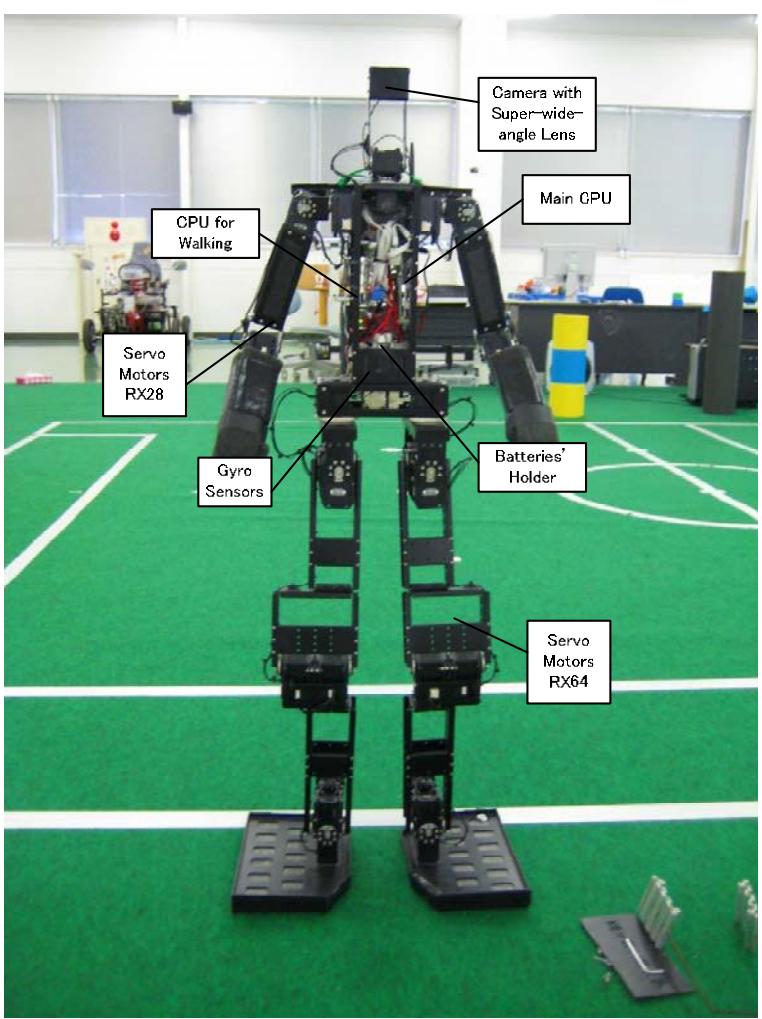
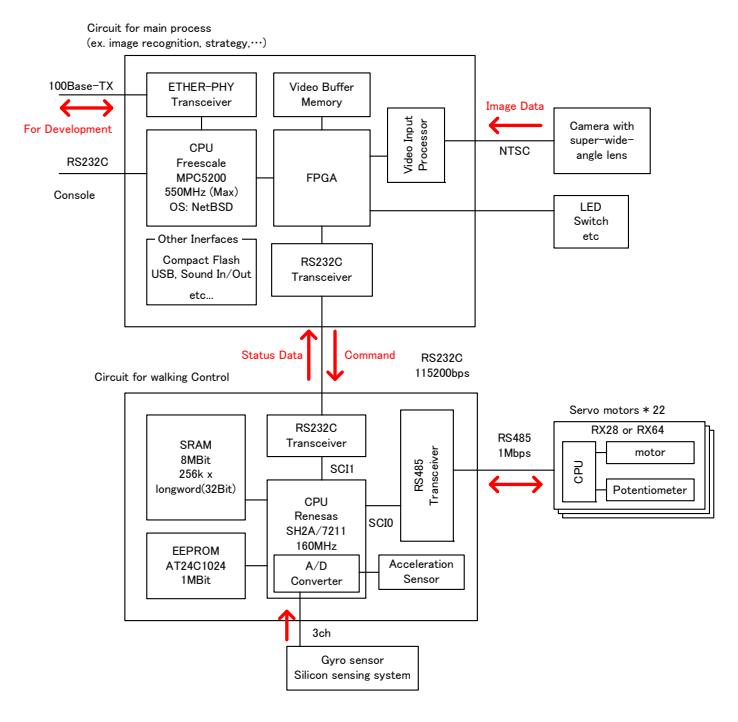
Table 1 Specification of the Robot
| Weight | 5.0 kg (Including Batteries) |
|---|---|
| Height | 1000 mm |
| Velocity (Forward) | 0.4 m/s (maximum) |
| Walking Directions | All direction and rotation |
| (Select the angle, stride, period and so on) | |
| CPU Board | Main: Brains Corp. mmEye-PPC (Freescale MPC5200) |
| Sub: Hajime Robot HC5 (Renesas SH-2A/7211) | |
| OS | NetBSD (mmEye-PPC) |
| Interface | Ether(100Base-TX) x 1, USB x 1(USB-wireless LAN), |
| CF x 1, RS232C x 2, Sound In/Out , Digital I/O, etc | |
| Servo Motor | Robotis RX28 x 8, RX64 x 14 |
| Battery | 14.8V x 1 |
3. The Mobility of The Robot
One of the significant features of our robot is the mobility. According to the command via RS232C, the robot activates many functions such as walking, kicking, returning the status data and so on. When the controller receives a command, it decodes and executes. If the command is related to servo motor control such as walk, motion generation and read status, the controller sends a command to servo motors via RS485. The controller also receives data from gyro sensor via A/D converter. According the data, the robot modifies the walking motion to prevent falls.
4. Computer System
One of significant feature of the robot is high computational capability. For using this advantage, the robot processes image data of 30 frames per a second. The CPU is MPC5200 and the operating system is NetBSD. It processes the image data, estimates the positions and determines the behavior in real time. After these processes, it sends a command to sub CPU board for controlling the robot. The NetBSD which is developed by Brains Corp. has significant merit compared to standard UNIX. It do not need to shutdown process, so we can power off at any time. It also has a FPGA, it helps real-time computing.
5. Image Processing and Position Estimation
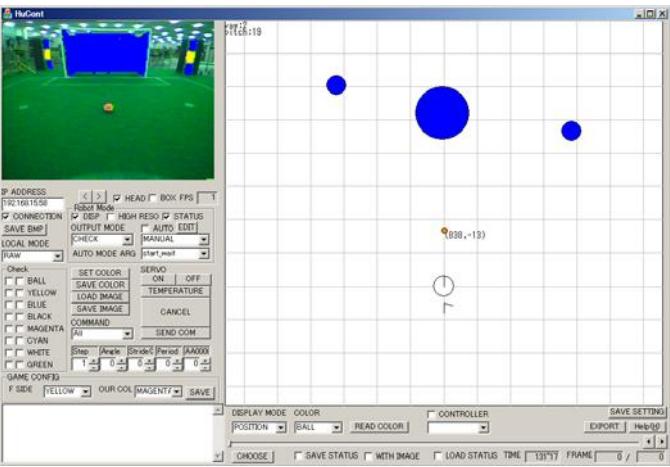
As mentioned above, the computer processes the image data of 30 frames per a second. However, the normal resolution of the image processing is 160x120. The initial captured resolution is 720x480. In image processing, it is reduced to 160x120 for keeping high speed. When the ball is far, the robot can not detect the ball because the image of the ball is very small. Then, the robot has two resolution mode of the image processing. Normally the resolution of image data is 160x120. When the robot can not detect the ball for a while, the mode is changed to high resolution mode. If the robot detects the ball, mode is turned back. When the robot selects the high resolution mode, the maximum frame rate of the image processing is approximately 20 fps. By simple image processing, it can detect the region of the same color. According to those data, it calculates the positions of ball, robots and landmarks. The position and direction of camera is calculated by inverse kinematics. The result is send and displayed on a PC. The example of the calculation is shown in Fig.3. Before this image processing, we should input the threshold of the color. We made an interface to input the value smoothly. The operator can change the value on GUI interface and check the effectiveness of the values immediately.
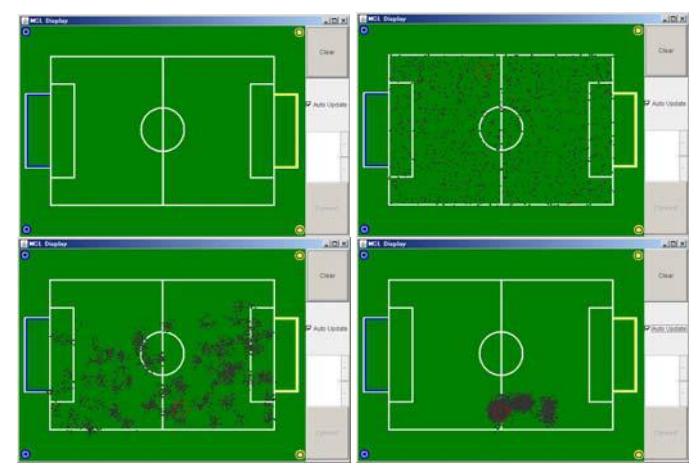
By measured positions of land mark, the position of the robot is estimated. We apply a particle filter to estimate it. It is shown in Fig. 4. If the robot detects the landmarks, the particles gather and bundle to collect position like the figure. The accuracy of the estimated position is not enough the goal keeper to move home position. Then, we are now trying to detect the white line to reduce the position error.
6. Strategy Development Environment
We develop a user-friendly interface for strategy development environment. The GUI is already displayed in Fig.3. The programmer can check many kind of thing in this interface. This interface is provided as following.
[output]
- simple command to sub CPU (the command can also generate by joystick, mouse and keyboard)
- threshold of color (its effectiveness can be check immediately)
- strategy name like forward and keeper (it select the program in robot
- fight side and our color
[input]
- image data (It is possible to display the result of image processing)
- detect and estimate positions (It is indicated graphically and saved in storage.)
- command to sub CPU (We can check the algorism)
- message (If the programmer want to know the robot status, he/she can insert the message in the program. It is also saved in storage)
- color values (We use the YUV color value.)
These are example of input/output data. More data is interacted on this interface. Using this interface, the programmer can check the algorism easily. He/She can refer almost all data, so he/she can find the problem smoothly.
7. Conclusion
In this paper we described on our system. Our system has some features. They are high mobility, well-designed control system, position estimation by one camera and user-friendly interface.